Free Shipping on Domestic Orders $75+

Mac Pro Late 2013 Interconnect Board Replacement

What you need

  1. Mac Pro Late 2013 Interconnect Board Replacement, Outer Case: step 1, image 1 of 2 Mac Pro Late 2013 Interconnect Board Replacement, Outer Case: step 1, image 2 of 2
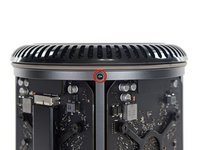
    • Slide the lock switch to the right, to the unlocked position.

    Ask FixBot
    Add Comment

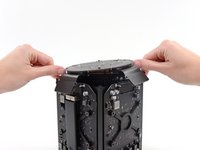
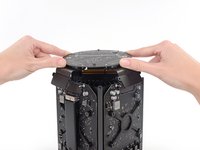
  2. Mac Pro Late 2013 Interconnect Board Replacement: step 2, image 1 of 3 Mac Pro Late 2013 Interconnect Board Replacement: step 2, image 2 of 3 Mac Pro Late 2013 Interconnect Board Replacement: step 2, image 3 of 3
    • Lift the outer case straight up off the Mac Pro.

    • It may help to push down on the center of the fan while lifting the case up.

    Ask FixBot
    Add Comment

  3. Mac Pro Late 2013 Interconnect Board Replacement, Fan Assembly: step 3, image 1 of 3 Mac Pro Late 2013 Interconnect Board Replacement, Fan Assembly: step 3, image 2 of 3 Mac Pro Late 2013 Interconnect Board Replacement, Fan Assembly: step 3, image 3 of 3
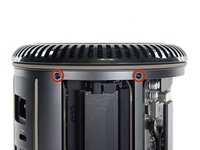
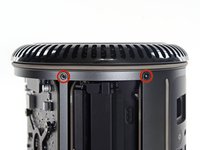
    • Remove five 5.1 mm T10 Torx screws from around the outer perimeter of the fan assembly.

    Ask FixBot

    Add Comment

  4. Mac Pro Late 2013 Interconnect Board Replacement: step 4, image 1 of 2 Mac Pro Late 2013 Interconnect Board Replacement: step 4, image 2 of 2
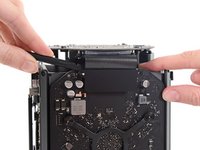
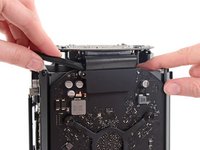
    • The fan assembly is attached to the rest of the computer by two cables on the IO board side.

    • Tilt the assembly up away from the IO board.

    • Do not try to remove the fan assembly yet, as it is still attached by two cables.

    Ask FixBot

    Add Comment

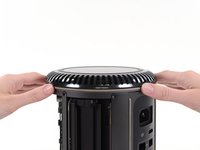
  5. Mac Pro Late 2013 Interconnect Board Replacement: step 5, image 1 of 1
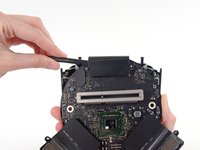
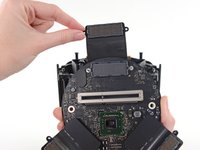
    • While supporting the fan assembly with one hand, loosen the two T8 captive screws in the fan cable bracket.

    • These screws are captive in the Mac Pro. Do not try to remove these screws from your Mac Pro.

    Ask FixBot
    Add Comment

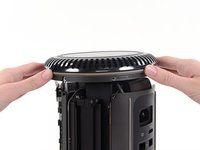
  6. Mac Pro Late 2013 Interconnect Board Replacement: step 6, image 1 of 1
    Tool used on this step:
    Tweezers
    $4.99
    Buy
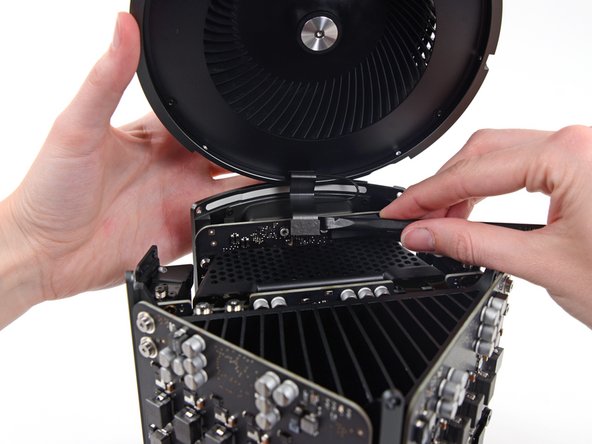
    • Use a pair of tweezers to pull the fan cable bracket away from the fan assembly.

    Ask FixBot
    Add Comment

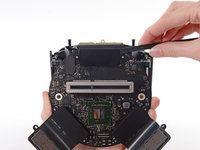
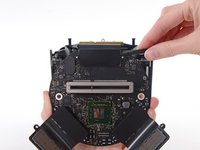
  7. Mac Pro Late 2013 Interconnect Board Replacement: step 7, image 1 of 2 Mac Pro Late 2013 Interconnect Board Replacement: step 7, image 2 of 2
    • Use the flat end of a spudger to disconnect the fan assembly ribbon cable from the IO board.

    Ask FixBot

    Add Comment

  8. Mac Pro Late 2013 Interconnect Board Replacement: step 8, image 1 of 1
    • Disconnect the fan assembly antenna cable from the IO board.

    • Remove the fan assembly from the Mac Pro.

    Ask FixBot

    Add Comment

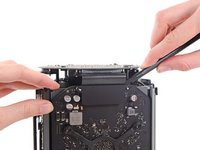
  9. Mac Pro Late 2013 Interconnect Board Replacement, Lower Case: step 9, image 1 of 3 Mac Pro Late 2013 Interconnect Board Replacement, Lower Case: step 9, image 2 of 3 Mac Pro Late 2013 Interconnect Board Replacement, Lower Case: step 9, image 3 of 3
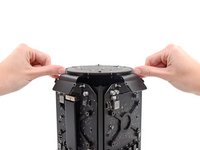
    • Flip the Mac Pro upside down, 180 degrees.

    • Remove five 5.1 mm T10 Torx screws from the outer perimeter of the lower case.

    Ask FixBot
    Add Comment

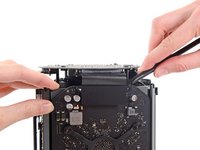
  10. Mac Pro Late 2013 Interconnect Board Replacement: step 10, image 1 of 2 Mac Pro Late 2013 Interconnect Board Replacement: step 10, image 2 of 2
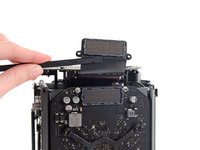
    • Carefully lift the lower case up and remove it from the Mac Pro.

    Ask FixBot
    Add Comment

  11. Mac Pro Late 2013 Interconnect Board Replacement, Interconnect Board: step 11, image 1 of 2 Mac Pro Late 2013 Interconnect Board Replacement, Interconnect Board: step 11, image 2 of 2
    • Use the flat end of a spudger and a twisting motion to gently separate one side of the graphics card data connection.

    Ask FixBot

    Add Comment

  12. Mac Pro Late 2013 Interconnect Board Replacement: step 12, image 1 of 3 Mac Pro Late 2013 Interconnect Board Replacement: step 12, image 2 of 3 Mac Pro Late 2013 Interconnect Board Replacement: step 12, image 3 of 3
    • Gently separate the other side as well.

    • Flip the connector up and out of the way of the graphics card.

    • Repeat this procedure on the other graphics card.

    Ask FixBot

    Add Comment

  13. Mac Pro Late 2013 Interconnect Board Replacement: step 13, image 1 of 1
    • Remove the two 6.0 mm T8 Torx screws securing the interconnect board to the heat sink.

    Ask FixBot

    Add Comment

  14. Mac Pro Late 2013 Interconnect Board Replacement: step 14, image 1 of 3 Mac Pro Late 2013 Interconnect Board Replacement: step 14, image 2 of 3 Mac Pro Late 2013 Interconnect Board Replacement: step 14, image 3 of 3
    • Gently walk the interconnect board straight up off the logic board's slot connection.

    • It is recommended to lift one side and then the other.

    • Do not try to remove the interconnect board from the Mac Pro yet, as it is still connected to the IO board.

    Ask FixBot

    Add Comment

  15. Mac Pro Late 2013 Interconnect Board Replacement: step 15, image 1 of 2 Mac Pro Late 2013 Interconnect Board Replacement: step 15, image 2 of 2
    • Flip the interconnect board up and over, exposing the IO board data cable.

    • Use the same sort of twisting and spreading motion with the flat end of a spudger to separate one side of the IO board data cable.

    Ask FixBot

    Add Comment

  16. Mac Pro Late 2013 Interconnect Board Replacement: step 16, image 1 of 2 Mac Pro Late 2013 Interconnect Board Replacement: step 16, image 2 of 2
    • Use the flat end of a spudger to separate the other side of the IO board data cable.

    • Bend the cable out of the way and remove the interconnect board from the Mac Pro.

    Ask FixBot

    Add Comment

Conclusion

To reassemble your device, follow these instructions in reverse order.

Cancel: I did not complete this guide.

8 other people completed this guide.

Andrew Optimus Goldheart

Member since: 10/17/09

515,187 Reputation

407 Guides authored

Team

iFixit Member of iFixit

Staff

122 Members

26,591 Guides authored

5 Guide Comments

Why is it necessary to remove the fan?

johnsburdett - Reply Share

I'm asking me the same question. Maybe it's for protecting the upper part and to have a stable stand when turning it around to remove the bottom part. I need to access the EFI Chip in the near future, I will see then.

Kris Wood - Reply Share

Hola necesito comprar esta placa de interconexión, donde puedo encontrarla? Saludos

RailabMac - Reply Share

excellent, thank you very much, I wanted to ask you where I can get this plate, what is the reference?

Asdrubal - Reply Share

Add Comment

View Statistics:

Past 24 Hours: 2

Past 7 Days: 17

Past 30 Days: 70

All Time: 7,537