
MSI PE70 6QE-035US speaker Replacement

Oscar Luis-Martinez and 2 other contributors
Last updated on May 14, 2024
Views: 423
View statistics:
- Past 24 Hours:
- 3
- Past 7 Days:
- 19
- Past 30 Days:
- 69
- All Time:
- 423
Comments: 0
No one has left comments on this guide. Will you be first?
Go to guide commentsCompleted: 0 1
No one has marked this guide "completed." Will you be the first?
1 person has marked this guide "completed." It's you — great job!
Favorites: 0 1
No one has favorited (and subscribed to) this guide. Will you be the first?
1 person has favorited (and subscribed to) this guide — and that's you!
Missing Details
Some of this guide's details are missing. Help users by adding tools, difficulty, or time.
Introduction
Go to step 1 ↓This guide will help you replace the speakers inside of the MSI PE70 6QE-035US. If your device has been having problems producing sound, replacing the speaker could be the solution you're looking for. Be sure to do these steps on a hard surface or anywhere that will not create any static electricity.
What you need
Tools


-
-
-
Start by flipping the device over to the backside.
-
Using the Phillips #0 screwdriver bit, unscrew all screws on the back panel.
 Ask FixBot
-
-
-
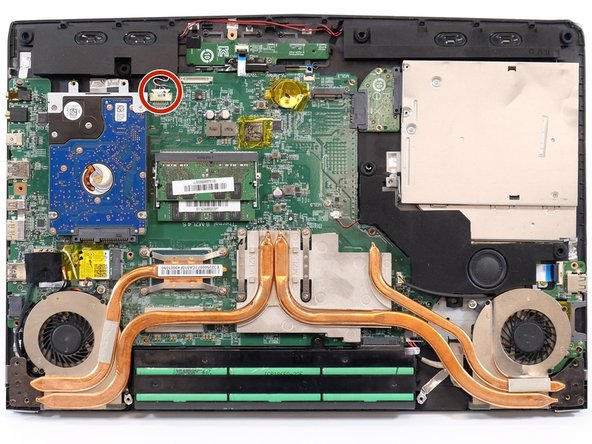
After you remove the back panel, you should now see the 3 speakers.
-
We will start with the bottom most speaker.
-
-
-
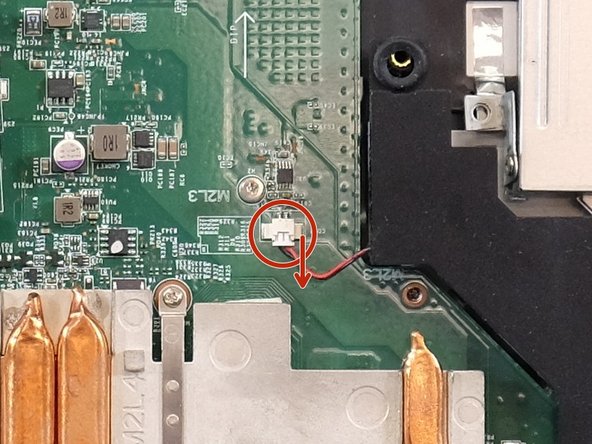
Using the ifixit opening tool, remove the speaker by gently unplugging its cord from the motherboard. Be sure to unplug the cord in the direction shown by the arrow.
-
After the cord has been unplugged, the speaker should now be able to be lifted out.
-
-
-
-
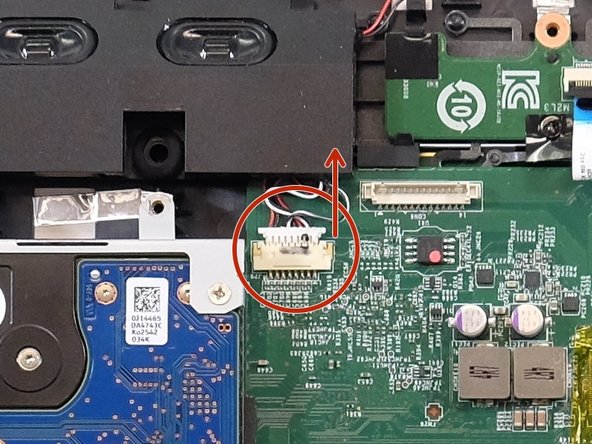
These two speakers will be taken out together because they are held in by the same cord.
-
Using the ifixit opening tool, remove the speaker by gently unplugging its cord from the motherboard. Be sure to unplug the cord in the direction shown by the arrow.
-
Once you have unplugged the cord, both speakers should be able to be lifted out.
-
-






To reassemble your device, follow these instructions in reverse order.
Team

Linn Benton Community College, Team 1-4, Karnes Fall 2023 Member of Linn Benton Community College, Team 1-4, Karnes Fall 2023
LBCC-KARNES-F23S1G4
4 Members
60 Guides authored
