What you need
-
-
-
Start by flipping the device over to the backside.
-
Using the Phillips #0 screwdriver bit, unscrew all screws on the back panel.
 Ask FixBot
-
-
-
-
after the back of the laptop is off, unscrew all the black and silver screws holding in the heat sink and fan covers.
-
There should be 8 silver, 6 black, and 14 screws in total.
-
-
-
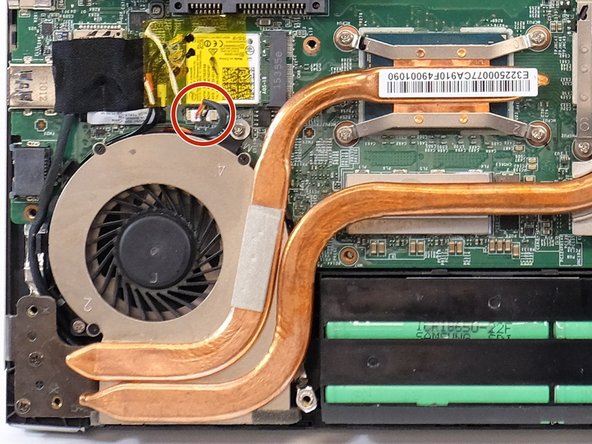
disconnect the wires that go from the fans to the motherboard.
-
then remove the fans from the mother board.
-
-




To reassemble your device, follow these instructions in reverse order.
Cancel: I did not complete this guide.
One other person completed this guide.

Team

Linn Benton Community College, Team 1-4, Karnes Fall 2023 Member of Linn Benton Community College, Team 1-4, Karnes Fall 2023
LBCC-KARNES-F23S1G4
4 Members
60 Guides authored
