Free Shipping on Domestic Orders $75+

MSI GT72 2QE Dominator Pro RAM Replacement

What you need

  1. MSI GT72 2QE Dominator Pro RAM Replacement, RAM: step 1, image 1 of 1
    • Remove the 7 indicated 6mm Phillips #00 screws.

    • Same PH0 screwdriver can be used in all steps.

    Ask FixBot

    Add Comment

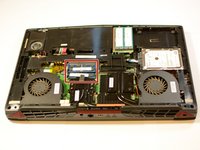
  2. MSI GT72 2QE Dominator Pro RAM Replacement: step 2, image 1 of 1
    • With the screws out, remove the bottom door.

    Ask FixBot

    Add Comment

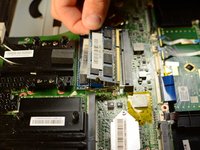
  3. MSI GT72 2QE Dominator Pro RAM Replacement: step 3, image 1 of 2 MSI GT72 2QE Dominator Pro RAM Replacement: step 3, image 2 of 2
    • Pull back clamps holding the RAM to remove it from the socket.

    Ask FixBot

    Add Comment

Conclusion

To reassemble your device, follow these instructions in reverse order.

Cancel: I did not complete this guide.

One other person completed this guide.

Nate

Member since: 04/18/17

128 Reputation

1 Guide authored

Team

Cal Poly, Team S17-G2, Banghart Spring 2017 Member of Cal Poly, Team S17-G2, Banghart Spring 2017

CPSU-BANGHART-S17S17G2

5 Members

7 Guides authored

1 Guide Comment

This guide is incomplete. There's 4 RAM slots, you've only shown the 2 on the near side of the motherboard.

luke - Reply Share

Add Comment

View Statistics:

Past 24 Hours: 4

Past 7 Days: 13

Past 30 Days: 35

All Time: 3,042