Introduction
If there are any issues with your MSI GT70 MS-1763 laptop's screen, whether it's a cracked or even a completely blank screen, it is important to replace it to restore the laptop. The screen is a very important part of the laptop, as it is responsible for displaying all the information on it. Without the screen working at full functionality, the user will be unable to complete important work. This guide will help you replace the screen. We will walk you through the steps to remove your screen in order to replace it.
Before you begin the repair, power off and unplug your laptop from the charging adapter and any peripheral devices.
What you need
-
-
-
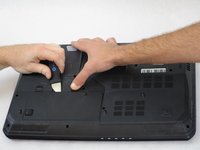
Release the safety latches that hold the battery in place. The left latch will stay moved up, while the right side is spring activated and will have to be held.
-
-
-
-
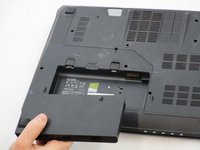
While holding up the left latch, use a Jimmy and slide the old battery out of its compartment.
-
-
-
-
Remove the rubber guards covering the two 3mm screws on the bottom of the screen. Next, remove the screws with a Phillips #0 screwdriver.
-
-
-
Remove the six Phillips #0 screws holding the screen in place.
-
Separate screen from the assembly with a Jimmy.
-
Remove the display cable from its connector on the back of the screen.
-
Remove the screen.
-
-


 Ask FixBot




To reassemble your device, follow these instructions in reverse order. Take your e-waste to an R2 or e-Stewards certified recycler.
Cancel: I did not complete this guide.
One other person completed this guide.

Team

South Arkansas Community College, Team S1-G2, Mitchell Fall 2019 Member of South Arkansas Community College, Team S1-G2, Mitchell Fall 2019
SACC-MITCHELL-F19S1G2
3 Members
72 Guides authored
