
MSI GS70 Hard Drive Replacement

Matthew Tasker and 7 other contributors
Last updated on Nov 16, 2022
Views: 17K
View statistics:
- Past 24 Hours:
- 6
- Past 7 Days:
- 27
- Past 30 Days:
- 115
- All Time:
- 17,481
Comments: 2
2 guide comments.
Go to guide commentsCompleted: 12 13
12 people have marked this guide "completed." Will you be next?
13 people have marked this guide "completed." Including you — great job!
Favorites: 2 3
2 people have favorited (and subscribed to) this guide. Will you be next?
3 people have favorited (and subscribed to) this guide — including you!
Action Shots
Be an action hero! This guide needs images that better demonstrate how to perform specific actions.
Needs Better Images
Better photos will improve this guide. Help out by taking, editing, or uploading new ones!
Needs More Images
A few more images would make this guide's procedures crystal clear.
Community-Contributed Guide
An awesome member of our community made this guide. It was not created by iFixit staff.
Introduction
Go to step 1 ↓This guide will show you how to repair or replace the Hard Drive for the MSI GS70. Replacement of the Hard Drive is fairly easy as you will only need a JIS #1 Screwdriver and a magnetic mat (Optional, but recommended)
What you need
Fix Kit
This kit contains all the parts and tools needed to complete this guide.

Parts


Tools


-
-
-
Using your JIS #1, locate and remove all screws from the backplate.
-
When all the screws are removed, proceed to remove the backplate. The hard drive will be located right next to the battery.
 Ask FixBot
-
-
-
Locate the black rubber spacer
-
Remove the spacer by gently pulling the flap
-
-
-
-
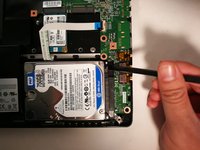
Carfully lift up the Hard Drive using your Spudger.
-
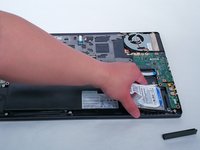
Next, pull up your hard drive from the battery end and proceed to remove the hard drive
-
-


To reassemble your device, follow these instructions in reverse order.
Cancel: I did not complete this guide.
12 other people completed this guide.

2 Guide Comments
The screws on my machine were Philips not torx don't know if it is different or has changed at all but all internal and external were Phillips
bonjour
comment accéder au disque dur msata sur le msi gs 70
