
MSI GS63VR 6RF Stealth Pro Wi-Fi Card Replacement

Nabil Ranjbar and 11 other contributors
Last updated on Jul 3, 2025
Views: 5.2K
View statistics:
- Past 24 Hours:
- 5
- Past 7 Days:
- 26
- Past 30 Days:
- 111
- All Time:
- 5,249
Comments: 3
3 guide comments.
Go to guide commentsCompleted: 1 2
1 person has marked this guide "completed." Will you be next?
2 people have marked this guide "completed." Including you — great job!
Favorites: 0 1
No one has favorited (and subscribed to) this guide. Will you be the first?
1 person has favorited (and subscribed to) this guide — and that's you!
Needs Better Images
Better photos will improve this guide. Help out by taking, editing, or uploading new ones!
Needs More Images
A few more images would make this guide's procedures crystal clear.
Missing Steps
Oops! This guide is currently missing one or more important steps.
Better Introduction
Improve this guide by completing or revising its introduction.
Introduction
Go to step 1 ↓If you're having connectivity issues with your Stealth Pro, or simply want to upgrade your connectivity, this guide will walk you through the replacement process.
What you need
Parts
Tools


-
-
-
Unscrew the 15 screws on the bottom panel of the computer using a Phillips #00 screwdriver. One screw will be hidden under a warranty sticker
-
Gently pry around the back cover off the with a plastic spudger
-
Unplug the battery cable from the motherboard.
 Ask FixBot
-
-
-
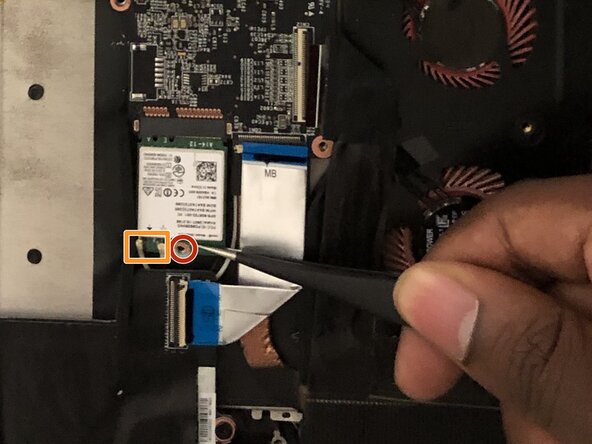
Unscrew the single screw from the Wi-Fi card using a Phillips #00 screwdriver.
-
Slide a thin, ESD-safe pry tool or angled tweezers under the metal neck of the connector (as close to the head as possible) and lift straight up from the board.
-
Using tweezers, carefully grab and remove the Wi-Fi card.
-
-
-




To reassemble your device, follow these instructions in reverse order. Take your e-waste to an R2 or e-Stewards certified recycler.
Cancel: I did not complete this guide.
One other person completed this guide.

Team

University of North Texas, Team S5-G5, Thomas Fall 2017 Member of University of North Texas, Team S5-G5, Thomas Fall 2017
UNT-THOMAS-F17S5G5
4 Members
48 Guides authored
3 Guide Comments
Is this a msata card or a m.2 card?
Hi, do you know where I can find some new wifi cables? I broke mine (with my WiFi card) and looking to repair it
Best regards
