Introduction
The process to replace the battery involves a few steps. The first step is unscrewing the 15 screws that hold the bottom plate together to gain access to the battery. The second step is unplugging the battery carefully to be replaced.
What you need
-
-
-
Remove the eleven 5mm screws with a Phillips #0 bit.
-
Remove the four 2.5mm screws with a Phillips #0 bit.
 Ask FixBot
-
-
-
-
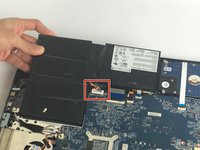
After opening the bottom plate, locate the battery and the battery connection.
-
-
-
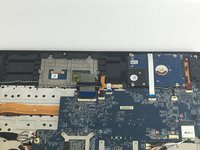
Unplug the battery connection carefully from the motherboard, and remove the old battery.
-
-


To reassemble your device, follow these instructions in reverse order.
Cancel: I did not complete this guide.
5 other people completed this guide.

Team

USF Tampa, Team S1-G4, Nance Fall 2017 Member of USF Tampa, Team S1-G4, Nance Fall 2017
USFT-NANCE-F17S1G4
3 Members
60 Guides authored
1 Guide Comment
The screws on corners doesnt have the same length. The Guide is wrong carefull!
