
MSI GP62MVR 6RF Leopard Pro LCD Screen Replacement

Jordan Buck and 2 other contributors
Last updated on Jun 17, 2020
Views: 2.5K
View statistics:
- Past 24 Hours:
- 2
- Past 7 Days:
- 20
- Past 30 Days:
- 103
- All Time:
- 2,470
Comments: 3
3 guide comments.
Go to guide commentsCompleted: 1 2
1 person has marked this guide "completed." Will you be next?
2 people have marked this guide "completed." Including you — great job!
Favorites: 0 1
No one has favorited (and subscribed to) this guide. Will you be the first?
1 person has favorited (and subscribed to) this guide — and that's you!
Introduction
Go to step 1 ↓This guide demonstrates how to replace the LCD screen in the MSI GP62MVR 6RF Leopard Pro laptop. It is a moderately difficult process with no special skills required. Avoid touching the circuitry when the screen is off to avoid short-circuiting components or shocking yourself. If the screen has odd pixels, discolored or incorrect textures, or fails to display anything at all, then the LCD screen will need to be replaced. Follow this guide to change the LCD screen in a MSI GP62MVR 6RF Leopard Pro.
What you need
Tools


-
-
-
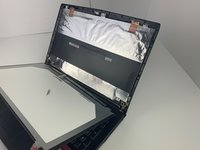
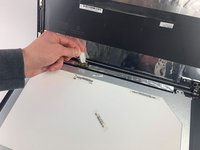
Remove the four 2 mm screws on the bottom and top corners of the screen using a Phillips #0 screwdriver.
-
-


 Ask FixBot


To reassemble your device, follow these instructions in reverse order.
Cancel: I did not complete this guide.
One other person completed this guide.

Team

Embry-Riddle Aeronautical University, Team S7-G6, Rauch Spring 2020 Member of Embry-Riddle Aeronautical University, Team S7-G6, Rauch Spring 2020
ERAU-RAUCH-S20S7G6
4 Members
72 Guides authored
3 Guide Comments
Hey Jordan, when reassembling the front cover (which in my case, a GP63 Leopard 8RE, is glued at the bottom) what type of glue should be used? Thanks
Hi Jaime, two part expoxy (Alraldite) glue should work, otherwise 3M double-sided adhesive tape would work as well.
