Free Shipping on Domestic Orders $75+

MSI GE72 6QF Apache Pro Screen Replacement

What you need

  1. MSI GE72 6QF Apache Pro Screen Replacement, Screen: step 1, image 1 of 3 MSI GE72 6QF Apache Pro Screen Replacement, Screen: step 1, image 2 of 3 MSI GE72 6QF Apache Pro Screen Replacement, Screen: step 1, image 3 of 3
    • Be careful when removing the bezel. The clips that hold it in place will break when too much pressure is applied.

    • Use the plastic opening tool to carefully pop the screen bezel off of the laptop.

    Ask FixBot

    Add Comment

  2. MSI GE72 6QF Apache Pro Screen Replacement: step 2, image 1 of 3 MSI GE72 6QF Apache Pro Screen Replacement: step 2, image 2 of 3 MSI GE72 6QF Apache Pro Screen Replacement: step 2, image 3 of 3
    • Using the Phillips #0 screwdriver, remove the four 3mm long screws.

    Ask FixBot

    Add Comment

  3. MSI GE72 6QF Apache Pro Screen Replacement: step 3, image 1 of 3 MSI GE72 6QF Apache Pro Screen Replacement: step 3, image 2 of 3 MSI GE72 6QF Apache Pro Screen Replacement: step 3, image 3 of 3
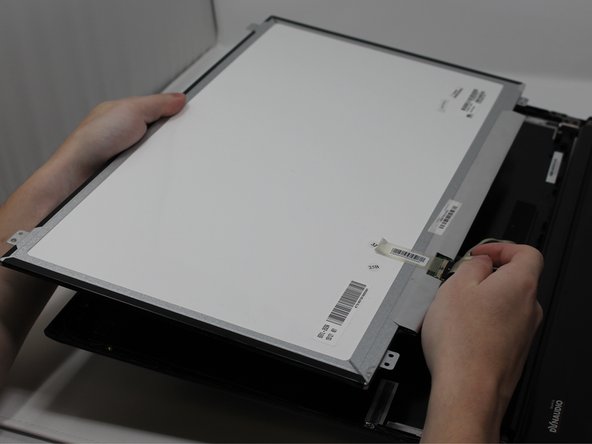
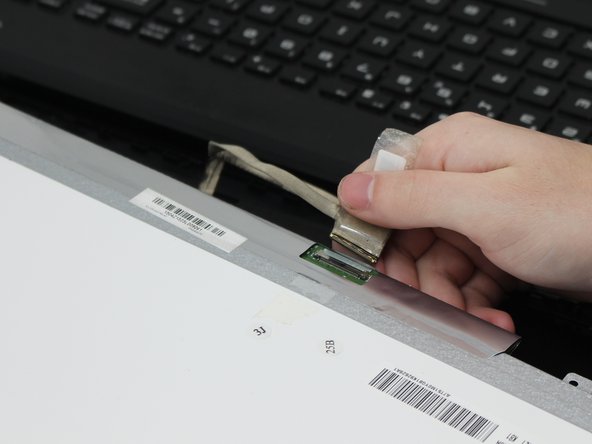
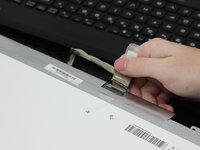
    • Flip the screen over and carefully peel off the tape that holds the connector in place.

    • When peeling off the tape, fold it back so that it can remain sticky for the new screen.

    Ask FixBot

    Add Comment

Conclusion

To reassemble your device, follow these instructions in reverse order.

Cancel: I did not complete this guide.

4 other people completed this guide.

0 Guide Comments

Add Comment

View Statistics:

Past 24 Hours: 0

Past 7 Days: 12

Past 30 Days: 49

All Time: 4,571