
MSI GE72 6QF Apache Pro Battery Replacement

Hovik Aklyan and 5 other contributors
Last updated on Jan 28, 2021
Views: 12K
View statistics:
- Past 24 Hours:
- 4
- Past 7 Days:
- 32
- Past 30 Days:
- 137
- All Time:
- 12,464
Comments: 6
2 comments on steps, 4 guide comments.
Go to guide commentsCompleted: 6 7
6 people have marked this guide "completed." Will you be next?
7 people have marked this guide "completed." Including you — great job!
Favorites: 1 2
1 person has favorited (and subscribed to) this guide. Will you be next?
2 people have favorited (and subscribed to) this guide — including you!
Introduction
Go to step 1 ↓This guide shows how to locate and remove the battery of a MSI GE72 6QF Apache Pro for possible replacement.
What you need
Fix Kit
This kit contains all the parts and tools needed to complete this guide.

Parts

Tools

-
-
-
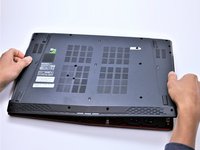
With the laptop closed and upside down, unscrew the nineteen 5.5mm Phillips #1 screws that keep the back cover in place.
 Ask FixBot
-
-
-
Use a Phillips screwdriver to remove the three screws along the edge of the optical drive bay.
-
-
-
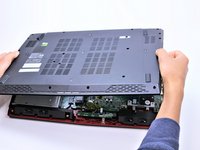
Using your fingers, gently loosen the edges of all four sides of the back cover.
-
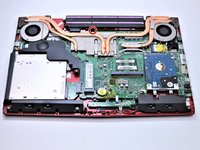
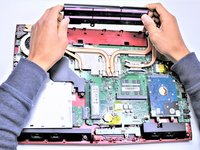
Gently pull off the back cover.
-
-
-
-
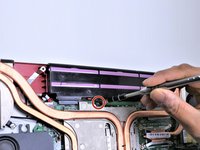
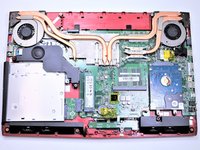
Grab the battery with your fingers and gently pull it up and away from the rest of the laptop.
-
-






To reassemble your device, follow these instructions in reverse order.
Cancel: I did not complete this guide.
6 other people completed this guide.

4 Guide Comments
hi there, can we use the laptop without the battery attached? i mean using only the power adaptor straight through the electric plug
yes you can, might drop bit of performance if you have Hybrid power management on, buyed my laptop used its 4 years old now and was used 2 years, dont even checked used battery but removed it and using AC power, just after a while gonna need to replace vents…
also cooling is problem in summers, cut-off some plastics and using cooling pad (recommending with 3+ vents or good airflow)
Faut démonter TOUTES les vis ??? Je vais en perdre la moitié !
Bravo!! plus simple c’était pas possibles?
Dire qu’avant on avait une trappe coulissante d’acces (DELL) ..
Les PC portables MSI ne sont pas les pire à réparer, loin de là !
Par expérience, l’étape la plus délicate c’est d’arriver à enlever le capot car il est maintenu par des clips en plastique, après on a accès à pratiquement toutes les pièces sur ce modèle.
Aujourd’hui, les PC portables avec une trappe coulissante existent toujours, mais ils sont cher :)
