
MSI GE62 6QF Apache Pro Battery Replacement

Justice Owens and 4 other contributors
Last updated on Jan 28, 2021
Views: 8K
View statistics:
- Past 24 Hours:
- 3
- Past 7 Days:
- 40
- Past 30 Days:
- 131
- All Time:
- 7,994
Comments: 2
1 comment on steps, 1 guide comment.
Go to guide commentsCompleted: 4 5
4 people have marked this guide "completed." Will you be next?
5 people have marked this guide "completed." Including you — great job!
Favorites: 0 1
No one has favorited (and subscribed to) this guide. Will you be the first?
1 person has favorited (and subscribed to) this guide — and that's you!
Introduction
Go to step 1 ↓Use this guide to remove the battery in your device.
What you need
Fix Kit
This kit contains all the parts and tools needed to complete this guide.

Parts

Tools


-
-
-
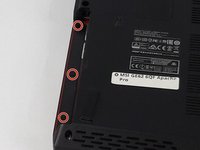
Use a Phillips screwdriver to remove the 5mm screw securing the optical drive to the bottom case.
 Ask FixBot
-
-
-
-
-
-
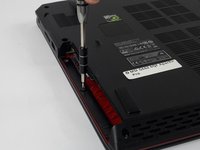
Use a Phillips screwdriver to remove the fourteen 5mm screws on the back of the laptop.
-
-
-
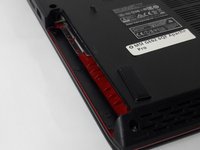
Remove the three PH #0 2mm screws that were hidden underneath the optical drive.
-
-
-
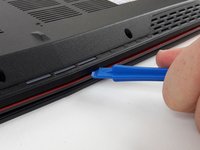
Use an opening tool to run along the seam of the case where the upper and bottom case meet.
-
Pry the bottom case and remove from the upper part.
-
-
-
-
-
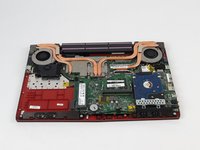
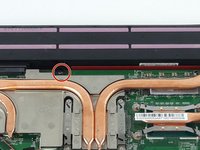
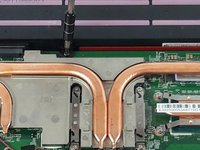
Remove the single PH #0 5mm screw holding the battery pack in place.
-
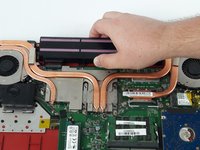
Remove the battery by sliding it away from the computer.
-
-






To reassemble your device, follow these instructions in reverse order.
Cancel: I did not complete this guide.
4 other people completed this guide.

Team

USF Tampa, Team S2-G3, Passmore Fall 2017 Member of USF Tampa, Team S2-G3, Passmore Fall 2017
USFT-PASSMORE-F17S2G3
3 Members
60 Guides authored
1 Guide Comment
Excellent guide! Very straightforward with very clear picture. I was able to replace my laptop battery using your tools and following your instruction! 10/10!
