
MECHREVO Z2 Laptop RAM Replacement

Songxun Cai and
Last updated on Dec 23, 2021
Views: 15K
View statistics:
- Past 24 Hours:
- 14
- Past 7 Days:
- 101
- Past 30 Days:
- 409
- All Time:
- 14,871
Comments: 2
2 guide comments.
Go to guide commentsCompleted: 17 18
17 people have marked this guide "completed." Will you be next?
18 people have marked this guide "completed." Including you — great job!
Favorites: 0 1
No one has favorited (and subscribed to) this guide. Will you be the first?
1 person has favorited (and subscribed to) this guide — and that's you!
What you need
Tools

Introduction
Go to step 1 ↓- Device name: MECHREVO Z2
- The purpose of this guide is to replace the RAM of your laptop.
- If your MECHREVO Z2 Laptop gets slow in use, you may need to replace or add RAM to your Laptop.
- Please disconnect the power supply before working.
- RAM
-
-
-
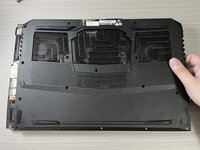
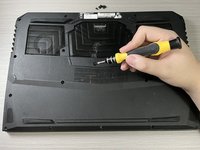
Using a Phillips screwdriver, remove eighteen 1.2mm Phillips #1 screws on the back.
 Ask FixBot
-
-
-
-
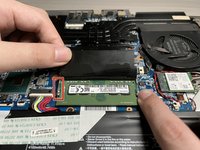
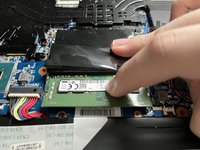
Open the retaining latches on either side of the RAM card with your fingers or plastic tool.
-
Remove the RAM.
-
-
-
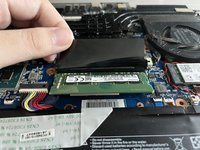
Align the notched part of the RAM with the raised part of the card slot.
-
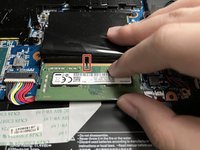
Push inward until the notch and bulge coincide.
-
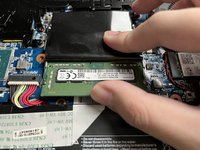
Press the other end of RAM down with your finger.
-
-






要放大说明您的设备,请进行这些操作。
Cancel: I did not complete this guide.
17 other people completed this guide.

Team

York University, Team F-25, Woodhouse Fall 2021 Member of York University, Team F-25, Woodhouse Fall 2021
YORK-WOODHOUSE-F21SFG25
1 Member
12 Guides authored
2 Guide Comments
here is the link:
