Free Shipping on Domestic Orders $75+

MCHOSE G3 Ultra 8K Scroll Wheel Replacement

What you need

  1. MCHOSE G3 Ultra 8K Scroll Wheel Replacement, Scroll Wheel: step 1, image 1 of 1
    • Disconnect any cables or USB connectors that are connected to the mouse.

    Ask FixBot

    Add Comment

  2. MCHOSE G3 Ultra 8K Scroll Wheel Replacement: step 2, image 1 of 1
    • Flip the mouse upside down and turn the switch to off.

    Ask FixBot

    Add Comment

  3. MCHOSE G3 Ultra 8K Scroll Wheel Replacement: step 3, image 1 of 3 MCHOSE G3 Ultra 8K Scroll Wheel Replacement: step 3, image 2 of 3 MCHOSE G3 Ultra 8K Scroll Wheel Replacement: step 3, image 3 of 3
    • Use a spudger to remove the mouse glides.

    • Be very careful to not damage the feet gliders if you are planning to reuse them.

    • Slide the point of the spudger under one of the glides making sure it goes under one pad at a time.

    • Slide the spudger further into the glide and lift to remove it. You may carefully use your finger to remove the remaining parts of the pad sticked to the mouse.

    • Repeat for other glides if necessary.

    Ask FixBot

    Add Comment

  4. MCHOSE G3 Ultra 8K Scroll Wheel Replacement: step 4, image 1 of 3 MCHOSE G3 Ultra 8K Scroll Wheel Replacement: step 4, image 2 of 3 MCHOSE G3 Ultra 8K Scroll Wheel Replacement: step 4, image 3 of 3
    • Use a spudger to remove the bottom mouse glides with the same process as the previous steps.

    • Separate each mouse glide in an organized fashion so that you know where which one will go during reassembly.

    Ask FixBot

    Add Comment

  5. MCHOSE G3 Ultra 8K Scroll Wheel Replacement: step 5, image 1 of 2 MCHOSE G3 Ultra 8K Scroll Wheel Replacement: step 5, image 2 of 2
    • Use a Phillips #1 screwdriver to remove the four screws located under the mouse glides.

    • Just like how you separated the mouse glides into four piles, organize and put each screw into next to the corresponding mouse glide.

    Ask FixBot

    Add Comment

  6. MCHOSE G3 Ultra 8K Scroll Wheel Replacement: step 6, image 1 of 3 MCHOSE G3 Ultra 8K Scroll Wheel Replacement: step 6, image 2 of 3 MCHOSE G3 Ultra 8K Scroll Wheel Replacement: step 6, image 3 of 3
    • Use a spudger to gently lift the opening space located above the side buttons.

    • Use the spudger to gently lift the left hand side of the back of the mouse.

    • Do the same for the right side.

    Ask FixBot

    Add Comment

  7. MCHOSE G3 Ultra 8K Scroll Wheel Replacement: step 7, image 1 of 3 MCHOSE G3 Ultra 8K Scroll Wheel Replacement: step 7, image 2 of 3 MCHOSE G3 Ultra 8K Scroll Wheel Replacement: step 7, image 3 of 3
    • Slide a spudger inside the opening space of the left mouse clicker and slightly lift it up. Repeat for the right mouse clicker.

    • Slide the spudger in the space located between the two mouse clickers and slightly lift it up.

    Ask FixBot

    Add Comment

  8. MCHOSE G3 Ultra 8K Scroll Wheel Replacement: step 8, image 1 of 2 MCHOSE G3 Ultra 8K Scroll Wheel Replacement: step 8, image 2 of 2
    • Open the mouse with your hands.

    • Potential for device damage. Do not attempt to open the mouse completely open because there are cables that are connecting the bottom shell to the top shell.

    Ask FixBot

    Add Comment

  9. MCHOSE G3 Ultra 8K Scroll Wheel Replacement: step 9, image 1 of 3 MCHOSE G3 Ultra 8K Scroll Wheel Replacement: step 9, image 2 of 3 MCHOSE G3 Ultra 8K Scroll Wheel Replacement: step 9, image 3 of 3
    • Use your fingers or tweezers to gently detach the cable connector located on the bottom right of the motherboard.

    • Pull the connector straight up and out of its socket.

    • Completely open the mouse.

    Ask FixBot

    Add Comment

  10. MCHOSE G3 Ultra 8K Scroll Wheel Replacement: step 10, image 1 of 2 MCHOSE G3 Ultra 8K Scroll Wheel Replacement: step 10, image 2 of 2
    • Use a Phillips #1 screwdriver to remove the four screws on the motherboard.

    • Potential for device damage. Do not attempt to lift the motherboard after unscrewing the four screws.

    Ask FixBot

    Add Comment

  11. MCHOSE G3 Ultra 8K Scroll Wheel Replacement: step 11, image 1 of 3 MCHOSE G3 Ultra 8K Scroll Wheel Replacement: step 11, image 2 of 3 MCHOSE G3 Ultra 8K Scroll Wheel Replacement: step 11, image 3 of 3
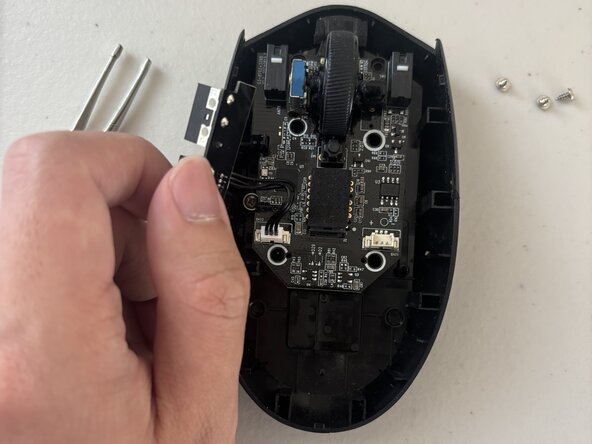
    • Gently remove the daughterboard for the side buttons which is located near the side buttons.

    • Simply slide out the two rectangles with a firm grip and leave it hanging outside of the mouse.

    Ask FixBot

    Add Comment

  12. MCHOSE G3 Ultra 8K Scroll Wheel Replacement: step 12, image 1 of 2 MCHOSE G3 Ultra 8K Scroll Wheel Replacement: step 12, image 2 of 2
    • Use your fingers or tweezers to detach the remaining cable connector located on the bottom left of the motherboard.

    Ask FixBot

    Add Comment

  13. MCHOSE G3 Ultra 8K Scroll Wheel Replacement: step 13, image 1 of 3 MCHOSE G3 Ultra 8K Scroll Wheel Replacement: step 13, image 2 of 3 MCHOSE G3 Ultra 8K Scroll Wheel Replacement: step 13, image 3 of 3
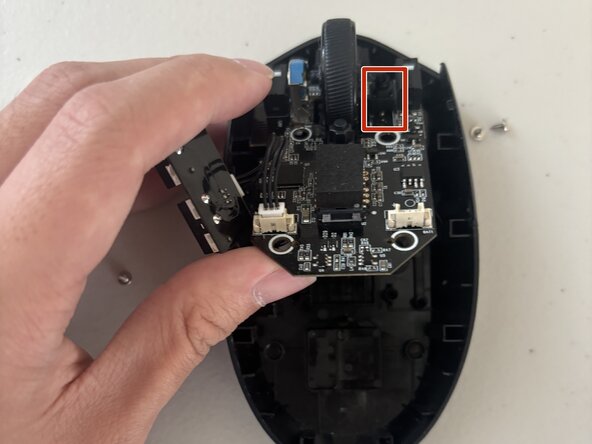
    • Gently lift the motherboard upwards so the metal spring located on the right side of the scroll wheel is not visible.

    Ask FixBot

    Add Comment

  14. MCHOSE G3 Ultra 8K Scroll Wheel Replacement: step 14, image 1 of 3 MCHOSE G3 Ultra 8K Scroll Wheel Replacement: step 14, image 2 of 3 MCHOSE G3 Ultra 8K Scroll Wheel Replacement: step 14, image 3 of 3
    • Hold the blue lock and the scroll wheel.

    • Slide the scroll wheel to the right.

    Ask FixBot

    Add Comment

Conclusion

To reassemble your device, follow these instructions in reverse order.

Cancel: I did not complete this guide.

Tyler W

Member since: 02/26/26

229 Reputation

1 Guide authored

Team

0 Guide Comments

Add Comment

View Statistics:

Past 24 Hours: 9

Past 7 Days: 40

Past 30 Days: 118

All Time: 217