
Lytro First Generation Light Sensor Replacement

Mira Green and 4 other contributors
Last updated on Feb 24, 2020
Views: 2.1K
View statistics:
- Past 24 Hours:
- 2
- Past 7 Days:
- 15
- Past 30 Days:
- 88
- All Time:
- 2,080
Comments: 1
1 comment on steps.
Completed: 2 3
2 people have marked this guide "completed." Will you be next?
3 people have marked this guide "completed." Including you — great job!
Favorites: 1 2
1 person has favorited (and subscribed to) this guide. Will you be next?
2 people have favorited (and subscribed to) this guide — including you!
Missing Steps
Oops! This guide is currently missing one or more important steps.
Introduction
Go to step 1 ↓This guide will demonstrate how to remove and replace a light sensor in the Lytro First Generation light field camera.
What you need
Tools

-
-
-
Remove the lens covering by using the plastic opening tool to pry it away from the camera. There are strong magnets attached to the bottom so some force is required.
-
-
-
Remove the four screws surrounding the lens using a screwdriver.
-
The screws hold the lens and screen assemblies together.
-
-
-
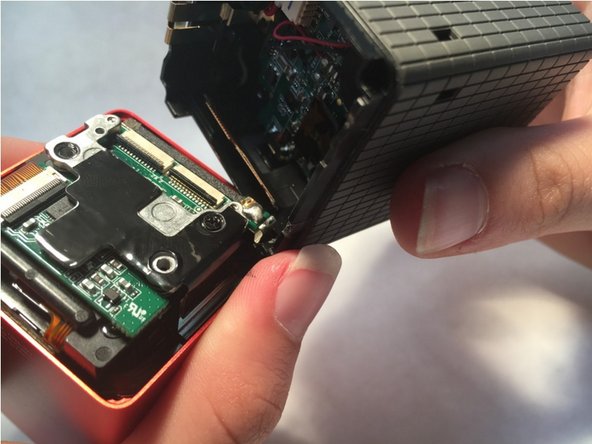
The seperation of the lens assembly and the screen assembly allows access to the motherboard
-
gently disconnect the two ribbon cables (indicated in red on the second image) that connect the motherboard to the lens assembly by lifting up the black pieces of the bracket and pulling gently.
-
There will be a slight bit of glue connecting the two potions that can be removed with a a little force.
-
-
-
-
Remove the three black screws indicated in red
-
Repeat the same process done to the first two ribbon cables with this one, indicated in orange.
-
-
-
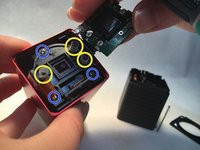
Remove the three springs (yellow) and unscrew the three screws (blue).
-
Replace the light sensor.
-

 Ask FixBot





To reassemble your device, follow these instructions in reverse order.
Cancel: I did not complete this guide.
2 other people completed this guide.

Team

Central Coast New Tech High, Team 6-1, Rushing Spring 2016 Member of Central Coast New Tech High, Team 6-1, Rushing Spring 2016
CCNTH-RUSHING-S16S6G1
2 Members
12 Guides authored
