Free Shipping on Domestic Orders $75+

Logitech Zone Wireless 2 Ear Pad Replacement

  1. Logitech Zone Wireless 2 Ear Pad Replacement, Power off the headset: step 1, image 1 of 1
    • Power off the headset and unplug all cables.

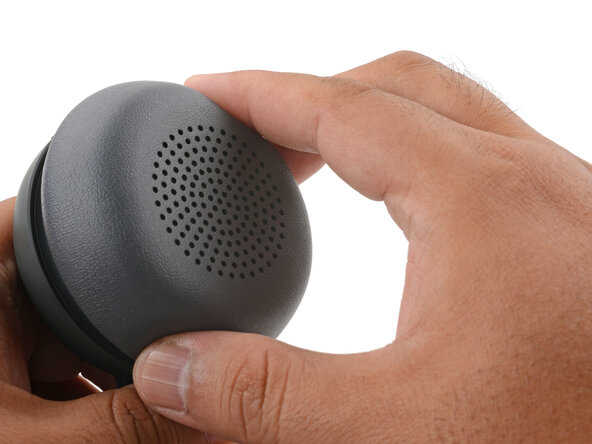
  2. Logitech Zone Wireless 2 Ear Pad Replacement, Remove the ear pad: step 2, image 1 of 3 Logitech Zone Wireless 2 Ear Pad Replacement, Remove the ear pad: step 2, image 2 of 3 Logitech Zone Wireless 2 Ear Pad Replacement, Remove the ear pad: step 2, image 3 of 3
    • If you're replacing the battery, you only need to remove the ear pad from the side that doesn't have the boom mic.

    • With one hand, firmly hold the ear cup steady.

    • With your free hand, twist the ear pad counter-clockwise until it feels loose.

    • Remove the ear pad.

  3. Logitech Zone Wireless 2 Ear Pad Replacement, Reassembly note: step 3, image 1 of 3 Logitech Zone Wireless 2 Ear Pad Replacement, Reassembly note: step 3, image 2 of 3 Logitech Zone Wireless 2 Ear Pad Replacement, Reassembly note: step 3, image 3 of 3
    • To install the ear pad:

    • Align the ear pad's notches to the tabs on the ear cup.

    • Press the pad onto the cup.

    • Twist the pad clockwise until it locks in place.

Conclusion

Repair didn’t go as planned? Try some basic troubleshooting, or ask our Answers community for help.

Arthur Shi

Member since: 01/03/18

328,013 Reputation

810 Guides authored

0 Guide Comments

Add Comment

View Statistics:

Past 24 Hours: 0

Past 7 Days: 5

Past 30 Days: 31

All Time: 94