
Logitech Z4 Desk Speaker Disassembly

kugelzucker and 2 other contributors
Last updated on Jan 9, 2026
Views: 4.6K
View statistics:
- Past 24 Hours:
- 7
- Past 7 Days:
- 54
- Past 30 Days:
- 192
- All Time:
- 4,602
Comments: 1
1 comment on steps.
Completed: 6 7
6 people have marked this guide "completed." Will you be next?
7 people have marked this guide "completed." Including you — great job!
Favorites: 1 2
1 person has favorited (and subscribed to) this guide. Will you be next?
2 people have favorited (and subscribed to) this guide — including you!
Grammar Police
Embrace your inner English teacher and help improve this guide's grammar!
Community-Contributed Guide
An awesome member of our community made this guide. It was not created by iFixit staff.
Introduction
Go to step 1 ↓Disassembling the desk-speaker of the Logitech Z4 to access the driver and soldering points of the cable.
As you can see, my speakers are quite old (around 2007 I believe) and the dissassembly did leave some more scratches and nicks, nothing that influenced the function of the speaker though.
The goal of the disassembly was to replace the cable that had a short close to the plug located at the sub-woofer.
What you need
Tools


-
-
-
Use a PH2 screwdriver to remove the two screws on the back of the speaker.
-
the speaker has a cinch connector to plug in to the sub-woofer.
 Ask FixBot
-
-
-
Removing the decorative front panel with a plastic pick (guitar picks work great). it is quite sturdy but the adhesive film on the back of it is strong, so go slow or heat it up with a hairdryer.
-
-
-
Removing the main screws for the speaker housing. Using the same driver (PH2) we can remove the 8 screws holding the main speaker assembly together.
-
-
-
Opening the speaker housing by prying it up evenly on all sides with the plastic pick.
-
It can be tapped lightly on the desk to make it fall out at the end of the process.
-
-
-
-
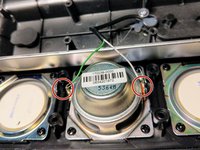
After opening the speaker fully you can see that the top and bottom membranes are not speakers, only decoration.
-
The middle one is connected with two wires matching the cinch connector on the cable.
-
The cable has a screw and some hot glue acting as a strain release for the cable.
-
-



To reassemble your device, follow these instructions in reverse order.
Cancel: I did not complete this guide.
6 other people completed this guide.

