
Logitech UE Megablast Power Button Assembly Replacement

Oscar Leyva and 3 other contributors
Last updated on Mar 20, 2026
Views: 272
View statistics:
- Past 24 Hours:
- 1
- Past 7 Days:
- 8
- Past 30 Days:
- 57
- All Time:
- 272
Comments: 1
1 comment on steps.
Completed: 0 1
No one has marked this guide "completed." Will you be the first?
1 person has marked this guide "completed." It's you — great job!
Favorites: 0 1
No one has favorited (and subscribed to) this guide. Will you be the first?
1 person has favorited (and subscribed to) this guide — and that's you!
Needs More Images
A few more images would make this guide's procedures crystal clear.
Missing Steps
Oops! This guide is currently missing one or more important steps.
Introduction
Go to step 1 ↓Is the power button in your UE Megablast feel like it gets stuck, cracks when pushed, or just doesn't power on the speaker? This guide will show you how to replace the battery in your UE Megablast speaker
Check the troubleshooting pages first to confirm that your speaker needs a new Power Button Assembly.
Before you begin this repair, turn off and unplug the speaker from the charger.
What you need
Tools


-
-
-
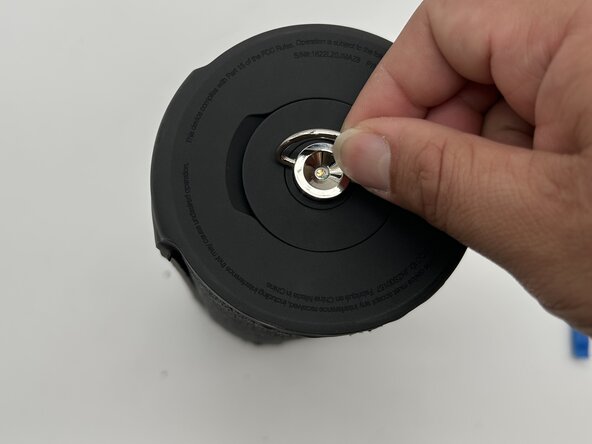
Turn the silver D-ring on one end of the speaker counterclockwise with your fingers to remove it.
 Ask FixBot
-
-
-
Insert the blue iFixit opening tool between the rubber end and the mesh.
-
Pry the rubber end to remove it.
-
-
-
Use the opening tool to gently lift a corner of the rubber spine.
-
Slowly lift the rubber away from each button, checking for adhesive or clips and carefully releasing them as you go.
-
-
-
Use an iFixit opening tool to gently pry open the lid at the top of the spine, starting at the 9 o’clock position as shown in the picture.
-
Continue to carefully pry toward the 6 and 3 o’clock positions until the spine and ends are completely detached from the speaker body.
-
Once all the edges are free, gently remove the spine and ends to avoid tearing.
-
-
-
Use the Phillips #2 screwdriver to remove the four 12 mm screws from the top of the button board.
-
-
-
-
Use the iFixit opening tool to gently pry the black plastic button board cover from the end of the speaker.
-
Remove the Bluetooth button board from the device.
-
Careful as you lift the board to avoid ripping the ribbon cable and coaxial cable connectors.
-
Slide a thin, ESD-safe pry tool or angled tweezers under the metal neck of the coaxial connector (as close to the head as possible) and lift straight up from the board.
-
Remove the PCB and set it aside.
-
-
-
Use a Phillips #2 screwdriver to remove three screws from the board
-
Using the nylon spudger or opening tool to gently pry under board from the cover.
-
-


To reassemble your device, follow these instructions in reverse order. Take your e-waste to an R2 or e-Stewards certified recycler.

Team

University of North Texas, Team 5-2, Kilpatrick Fall 2025 Member of University of North Texas, Team 5-2, Kilpatrick Fall 2025
UNT-KILPATRICK-F25S5G2
4 Members
60 Guides authored
