
Logitech UE MegaBoom 3 Battery Replacement

Jason Doland and 5 other contributors
Last updated on May 7, 2024
Views: 4.9K
View statistics:
- Past 24 Hours:
- 10
- Past 7 Days:
- 53
- Past 30 Days:
- 245
- All Time:
- 4,854
Comments: 0
No one has left comments on this guide. Will you be first?
Go to guide commentsCompleted: 5 6
5 people have marked this guide "completed." Will you be next?
6 people have marked this guide "completed." Including you — great job!
Favorites: 2 3
2 people have favorited (and subscribed to) this guide. Will you be next?
3 people have favorited (and subscribed to) this guide — including you!
Needs More Images
A few more images would make this guide's procedures crystal clear.
Missing Steps
Oops! This guide is currently missing one or more important steps.
Introduction
Go to step 1 ↓If your speaker does not turn on, does not charge through the usb port or the power dock, or if it does not hold charge like it should, it may be time to replace the battery. The following guide will show you how to replace the battery in the Logitech UE MegaBoom 3.
The battery is used the power the speaker, it is manufactured to hold power for 20 hours per full charge. The specific battery used in this speaker is a 7.2 Volt, 3130mAH/22.5Wh ion rechargeable battery.
Before starting this guide make sure that both charging ports are not working because if only one of them is not charging the device the issue at hand is most likely not the battery. It could be likely that the ports are clogged with debris which could be causing the battery not to charge. It does not take a lot of debris to cause the battery not to charge so be sure to inspect the ports very thoroughly. If the ports are clogged use air or a toothpick to remove the debris. If all of the ports are clear of debris, you will need to use this guide to remove the battery.
There are no special skills needed to complete this guide besides the knowledge of how to use a screwdriver and plyers.
What you need
Tools


-
-
-
To access all internal components, first flip the speaker upwards to where you can see the base.
-
Place your blue iFixit opening picks inside the gap between the speaker and the base to act as a lever when opening the speaker.
 Ask FixBot
-
-
-
Using the flat head #4.5 screw driver, carefully lever and rotate the driver around the edge of the speaker to enlarge the gap further.
-
Pry off the base of the speaker and remove the end cap.
-
-
-
-
-
Tool used on this step:Tweezers$4.99
-
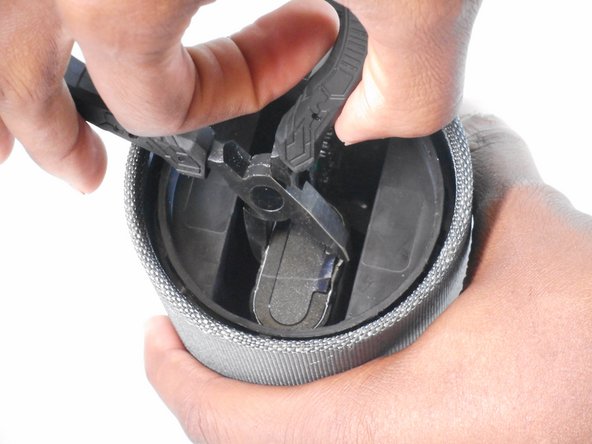
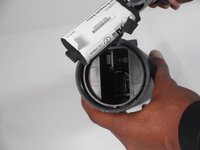
Remove the lithium-ion battery from the inside of the speaker by gripping the battery using the plyers.
-
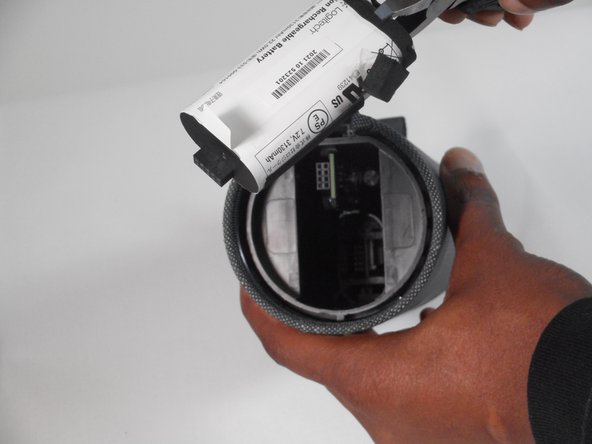
The battery should slide out as you pull against it with the plyers.
-
Remove the battery.
-
-


To reassemble your device, follow these instructions in reverse order.
Cancel: I did not complete this guide.
5 other people completed this guide.

Team

University of Memphis, Team 1-2, Sneed Fall 2023 Member of University of Memphis, Team 1-2, Sneed Fall 2023
UM-SNEED-F23S1G2
4 Members
84 Guides authored
