Introduction
This guide is for the Logitech UE Boom 3 - model number: S-00171. Alternative model numbers could be S-00171-A, S-00171-B, S-00171-C.
The primary objective of this guide is to provide step-by-step instructions for replacing the USB port of the Logitech UE BOOM 3. By following these instructions carefully, users can address issues such as damaged or malfunctioning USB ports, restoring the device's ability to charge and connect to external devices.
The USB port is a crucial component of the Logitech UE BOOM 3 speaker, serving as the primary interface for charging the device and connecting it to external audio sources. This port facilitates data transfer and power delivery, allowing users to charge their speaker and connect with compatible devices.
What you need
-
-
-
Flip the speaker so the base is facing upwards.
-
Place the iFixit opening picks in the gaps of the speaker.
-
Use the picks to pry open the speaker.
 Ask FixBot
-
-
-
-
-
-
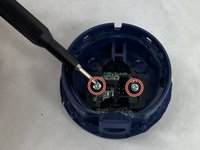
Remove two screws holding the USB port control board in place using a Phillips #00 screwdriver.
-
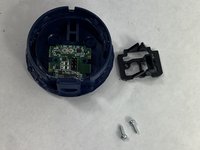
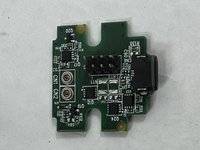
Remove the bracket and USB port control board from the base.
-
-


To reassemble your device, follow these instructions in reverse order.

Team

UMass Dartmouth, Team 1-4, Konn Spring 2024 Member of UMass Dartmouth, Team 1-4, Konn Spring 2024
UMASSD-KONN-S24S1G4
4 Members
72 Guides authored
