
Logitech MBJ58 Mouse Support Spring Replacement

Conor Whatley and 14 other contributors
Last updated on Jan 5, 2021
Views: 5.5K
View statistics:
- Past 24 Hours:
- 4
- Past 7 Days:
- 30
- Past 30 Days:
- 150
- All Time:
- 5,517
Comments: 9
8 comments on steps, 1 guide comment.
Go to guide commentsCompleted: 6 7
6 people have marked this guide "completed." Will you be next?
7 people have marked this guide "completed." Including you — great job!
Favorites: 1 2
1 person has favorited (and subscribed to) this guide. Will you be next?
2 people have favorited (and subscribed to) this guide — including you!
Introduction
Go to step 1 ↓Use this guide to replace a faulty support spring in your Logitech MBJ58 Mouse.
This spring is responsible for keeping the scroll wheel in proper alignment with the components of the mouse. Over time, this spring can start to wear out and lose its ability to do this. Once that happens, it is a good idea to start considering replacing the spring to keep the mouse scroll wheel functioning correctly.
What you need
Tools

-
-
-
Hold the mouse so that the bottom is facing up.
-
Remove the single Phillips #1 screw from the bottom half of the mouse.
 Ask FixBot
-
-
-
Place the mouse so that the bottom is resting against a hard surface.
-
Lift the top cover of the mouse gently, and remove it.
-
-
-
-
-
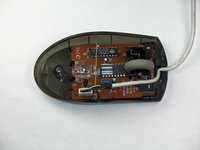
Locate the scroll wheel on the mouse.
-
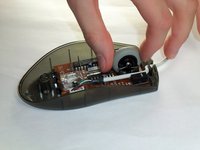
Grab the scroll wheel with your thumb and index finger.
-
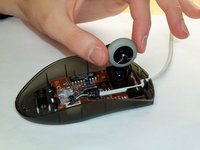
Gently lift up, to remove the scroll wheel from the mouse.
-
-
-
-
-
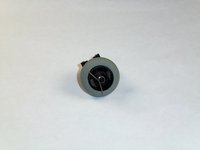
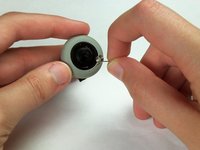
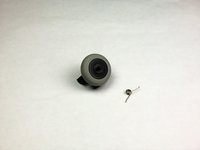
Locate the spring on the scroll wheel, and carefully remove the spring.
-
-
-
-
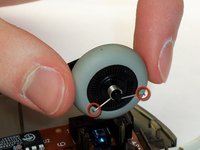
Place the replacement spring on the correct side of the wheel (shown in the images) with the prongs pointing down.
-
-






To reassemble your device, follow these instructions in reverse order.
Cancel: I did not complete this guide.
6 other people completed this guide.

Team

Cal Poly, Team 5-14, Forte Winter 2013 Member of Cal Poly, Team 5-14, Forte Winter 2013
CPSU-FORTE-W13S5G14
5 Members
84 Guides authored
1 Guide Comment
The thing with the spring - still in 2024 helpful!
Thanks a lot! :-)
