
Logitech M215 Battery Replacement

Hannah Pate and 2 other contributors
Last updated on Aug 24, 2015
Views: 125K
View statistics:
- Past 24 Hours:
- 10
- Past 7 Days:
- 56
- Past 30 Days:
- 253
- All Time:
- 124,889
Comments: 19
9 comments on steps, 10 guide comments.
Go to guide commentsCompleted: 28 29
28 people have marked this guide "completed." Will you be next?
29 people have marked this guide "completed." Including you — great job!
Favorites: 2 3
2 people have favorited (and subscribed to) this guide. Will you be next?
3 people have favorited (and subscribed to) this guide — including you!
Introduction
Go to step 1 ↓For this replacement you do not need any tools, however a prying tool may make the replacement easier.
Make sure that the mouse is turned off before replacing the battery. This will reduce the chance of damaging internal components with a surge of power from the new battery.
What you need
Parts

Tools


-
-
-
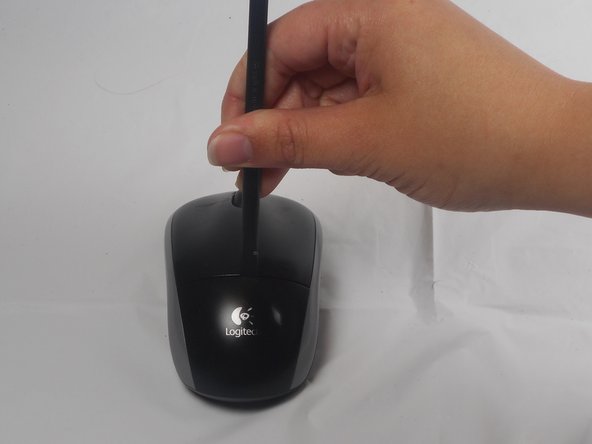
The battery compartment cover is located on the top of the mouse. The seam running horizontally across the mouse is the top of the cover.
-
There is a button to pop off the cover. It is located on the bottom of the mouse. you may need to press hard on this button to pop the cover.
-
If the button does not work, you will need to pry off the cover. You can use your fingernails or a prying tool in order to do this, as seen in the third image.
 Ask FixBot
-
-
-
Remember to insert the new battery in the same orientation as the old one. The positive (plus) end should be facing away from the buttons.
-
-
-




To reassemble your device, follow these instructions in reverse order.
Cancel: I did not complete this guide.
28 other people completed this guide.

Team

USF Tampa, Team 1-1, Watkins Winter 2015 Member of USF Tampa, Team 1-1, Watkins Winter 2015
USFT-WATKINS-W15S1G1
4 Members
84 Guides authored
10 Guide Comments
I disassembled this exactly as stated and now I can't get the cover back on?
I am a electronic technologist and this is a poor design for a mouse. No wonder the later version is different.
Thanks for the information. It worked perfectly for me. Easy removal. Images and instructions were very helpful.
The green battery light went on, although the lazar light did not. What should I do?
