
Logitech K850 Disassembly

Camuise and 2 other contributors
Last updated on May 7, 2024
Views: 14K
View statistics:
- Past 24 Hours:
- 11
- Past 7 Days:
- 54
- Past 30 Days:
- 273
- All Time:
- 13,508
Comments: 14
11 comments on steps, 3 guide comments.
Go to guide commentsCompleted: 4 5
4 people have marked this guide "completed." Will you be next?
5 people have marked this guide "completed." Including you — great job!
Favorites: 0 1
No one has favorited (and subscribed to) this guide. Will you be the first?
1 person has favorited (and subscribed to) this guide — and that's you!
Community-Contributed Guide
An awesome member of our community made this guide. It was not created by iFixit staff.
What you need
Tools
-
Spudger4.9
-


-
-
-
Pry open the battery cover on the back of the device using either your hand or a spudger.
-
Use a spudger to remove the first battery.
-
Slide the 2nd battery out of the slot.
 Ask FixBot
-
-
-
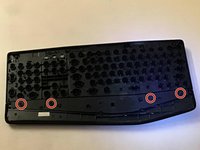
Unscrew the highlighted red screws using a Phillips 000 screwdriver.
-
-
-
Insert a spudger into the seam between the black side (front) and the white side (back).
-
Pry the two halves apart, making your way around the keyboard.
-
-
-
Flip the black side (front) over so the keys face downwards.
-
Remove the red highlighted screws, then remove the palm rest.
-
-
-
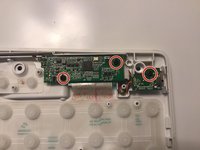
Unscrew the circuit boards using a Phillips 000 screwdriver.
-
-
Tool used on this step:Tweezers$4.99
-
Use a pair of tweezers to bring the metal rods under and over the plastic hooks.
-
-
-
-
Unplug the ribbon cable connecting the two boards and remove the power switch daughter board.
-
Unplug the ribbon cable connecting the membrane to the main circuit board.
-
-






The Logitech K850 keyboard is quite complex, though it is somewhat easy to fix. However, with a ton of fragile components that need to be pried on, repairs can be difficult.
Cancel: I did not complete this guide.
4 other people completed this guide.

3 Guide Comments
How do I fix the incredibly tiny plastic piece where the foot/stand fits into? Are the side wholes enough to get two new feet without having to worry about that plastic part or does it need ot hook into that?
?
It is difficult for key plucker to remove keys from.mk850 . Is there a easy way to remove keys from it?
my space is ghost typing (automatically working) i opened and cleaned but still issue persist. any help would be appreciated.
