Free Shipping on Domestic Orders $75+

Logitech G700s Left and Right Mouse Button Disassembly

What you need

  1. Logitech G700s Left and Right Mouse Button Disassembly, Top Case Replacement: step 1, image 1 of 1
    • Remove the batteries from the mouse.

    • Use a plastic opening tool to peel up the four mouse feet.

    Ask FixBot

    Add Comment

  2. Logitech G700s Left and Right Mouse Button Disassembly: step 2, image 1 of 2 Logitech G700s Left and Right Mouse Button Disassembly: step 2, image 2 of 2
    • Remove the five 5.5mm Phillips #00 screws found underneath the mouse feet.

    Ask FixBot

    Add Comment

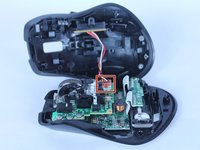
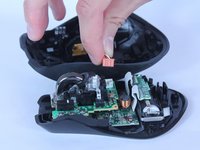
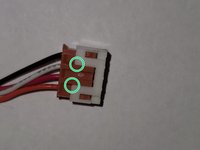
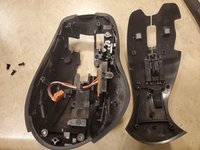
  3. Logitech G700s Left and Right Mouse Button Disassembly: step 3, image 1 of 3 Logitech G700s Left and Right Mouse Button Disassembly: step 3, image 2 of 3 Logitech G700s Left and Right Mouse Button Disassembly: step 3, image 3 of 3
    • Pull the top of the mouse off of the bottom half.

    • There's a wire connecting the two halves.

    • Unplug the programmable buttons from the motherboard.

    • The white pin housing on the motherboard may come off while unplugging. In that case, use tool to pry between at location indicated to separate them and insert the housing back onto the motherboard.

    Ask FixBot

    Add Comment

  4. Logitech G700s Left and Right Mouse Button Disassembly, Logitech G700s Left and Right Mouse Button Disassembly: step 4, image 1 of 2 Logitech G700s Left and Right Mouse Button Disassembly, Logitech G700s Left and Right Mouse Button Disassembly: step 4, image 2 of 2
    • Pop the right button piston off the ledge thingy

    • Then pop the left button piston off

    • It can take a bit of force to pop them off.

    Ask FixBot

    Add Comment

  5. Logitech G700s Left and Right Mouse Button Disassembly: step 5, image 1 of 2 Logitech G700s Left and Right Mouse Button Disassembly: step 5, image 2 of 2
    • Remove the three Philips head screws holding the left and right button clicker in place

    Ask FixBot

    Add Comment

  6. Logitech G700s Left and Right Mouse Button Disassembly: step 6, image 1 of 2 Logitech G700s Left and Right Mouse Button Disassembly: step 6, image 2 of 2
    • Remove the left and right button & G13 & scroll wheel lock assembly from the top shell assembly.

    • You can push on indicated locations to gain leverage

    Ask FixBot

    Add Comment

Conclusion

To reassemble your device, follow these instructions in reverse order.

Cancel: I did not complete this guide.

dennis97519

Member since: 10/18/11

534 Reputation

3 Guides authored

0 Guide Comments

Add Comment

View Statistics:

Past 24 Hours: 1

Past 7 Days: 4

Past 30 Days: 31

All Time: 2,892