Free Shipping on Domestic Orders $75+

Logitech G502 Proteus Core Mouse Feet Replacement

Views: 12K

View statistics:

Past 24 Hours:
3
Past 7 Days:
23
Past 30 Days:
117
All Time:
12,045
Comments: 1

1 guide comment.

Go to guide comments
Completed: 4

4 people have marked this guide "completed." Will you be next?

Favorites: 3

3 people have favorited (and subscribed to) this guide. Will you be next?

Time Required: 10 - 15 minutes
Difficulty: Easy
Logitech G502 Proteus Core Mouse Feet Replacement

Introduction

Go to step 1 ↓

There may come a time when the feet of your mouse become worn or torn and you want to replace them. Follow this guide to replace the feet on your G502 Proteus Core Mouse.

The feet of your mouse needs to be intact for the mouse to be able to glide smoothly on your mouse pad. This is important for competitive games where mouse movements need to be quick and precise.

What you need

Parts

Tools

  • Spudger
    4.9
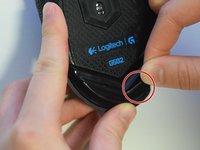
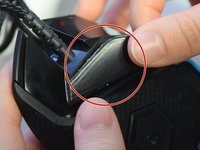
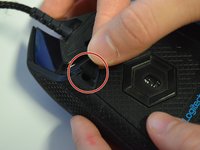
    1. Logitech G502 Proteus Core Mouse Feet Replacement, Mouse Feet: step 1, image 1 of 3 Logitech G502 Proteus Core Mouse Feet Replacement, Mouse Feet: step 1, image 2 of 3 Logitech G502 Proteus Core Mouse Feet Replacement, Mouse Feet: step 1, image 3 of 3
      • Use your fingers or a nylon spudger to peel the old feet off all three corners where the screw holes are exposed.

      Ask FixBot

      Add Comment

    2. Logitech G502 Proteus Core Mouse Feet Replacement: step 2, image 1 of 3 Logitech G502 Proteus Core Mouse Feet Replacement: step 2, image 2 of 3 Logitech G502 Proteus Core Mouse Feet Replacement: step 2, image 3 of 3
      • Peel the backing off the new mouse feet to reveal the adhesive.

      Ask FixBot

      Add Comment

    3. Logitech G502 Proteus Core Mouse Feet Replacement: step 3, image 1 of 3 Logitech G502 Proteus Core Mouse Feet Replacement: step 3, image 2 of 3 Logitech G502 Proteus Core Mouse Feet Replacement: step 3, image 3 of 3
      • Apply the new mouse feet to their designated areas based on shape.

      Ask FixBot

      Add Comment

    4. Logitech G502 Proteus Core Mouse Feet Replacement: step 4, image 1 of 1
      • Apply even pressure across the mouse feet to ensure adherence.

      Ask FixBot

      Add Comment

    5. Logitech G502 Proteus Core Mouse Feet Replacement: step 5, image 1 of 1
      • Let adhesive sit for about 5-10 minutes with applied pressure.

      Ask FixBot

      Add Comment

Conclusion

To reassemble your device, follow these instructions in reverse order.

Cancel: I did not complete this guide.

4 other people completed this guide.

Sage Farray

Member since: 04/10/17

547 Reputation

3 Guides authored

Team

UW Tacoma, Team S3-G1, Liner Spring 2017 Member of UW Tacoma, Team S3-G1, Liner Spring 2017

UWT-LINER-S17S3G1

4 Members

36 Guides authored

1 Guide Comment

You completely omitted half of the feet located on the mouse. The ones left out are the 3 located on the removable panel: there are 2 “v” shaped ones around the sensor and the one to the right of the “v” shapes.

Robert - Reply Share

Add Comment

View Statistics:

Past 24 Hours: 3

Past 7 Days: 23

Past 30 Days: 117

All Time: 12,045