Free Shipping on Domestic Orders $75+

Logitech G305 Feet Replacement

Views: 3.9K

View statistics:

Past 24 Hours:
6
Past 7 Days:
48
Past 30 Days:
207
All Time:
3,948
Comments: 1

1 comment on steps.

Completed: 1

1 person has marked this guide "completed." Will you be next?

Favorites: 0

No one has favorited (and subscribed to) this guide. Will you be the first?

Time Required: 10 - 20 minutes
Difficulty: Moderate
OEM Guide

iFixit collaborated with the manufacturer to make this guide.

Logitech

Logitech and iFixit are working together to help people repair their Logitech devices.

Logitech G305 Feet Replacement

Introduction

Go to step 1 ↓

Use this guide to replace worn-out or damaged feet (also known as skates, glides, slides, or pads) on your Logitech G305 wireless gaming mouse.

What you need

Fix Kit

This kit contains all the parts and tools needed to complete this guide.

Parts

Tools

    1. Logitech G305 Feet Replacement, Turn off your mouse: step 1, image 1 of 2 Logitech G305 Feet Replacement, Turn off your mouse: step 1, image 2 of 2
      • Slide your mouse's power switch to the left so it's in the OFF position.

      • A red indicator should be visible beneath the switch.

      • Throughout your repair, it may be helpful to lay your mouse on a soft cloth to stabilize it and prevent damage while you work.

      Ask FixBot

      Add Comment

    1. Logitech G305 Feet Replacement, Remove the mouse feet: step 2, image 1 of 2 Logitech G305 Feet Replacement, Remove the mouse feet: step 2, image 2 of 2
      • The feet are secured to the bottom of the mouse with adhesive. In order to cleanly remove them, the adhesive needs to be thoroughly heated.

      • Heat an iOpener and lay it on the mouse feet for one minute to heat the adhesive.

      • Alternatively, you can use a hair dryer on the Low heat setting to soften the adhesive.

      • If you're using a hair dryer, only heat the feet a few seconds at a time or you may warp the plastic shell.

      Ask FixBot

      Add Comment

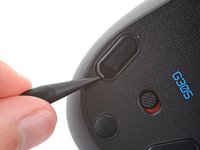
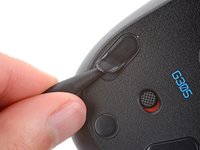
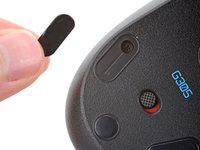
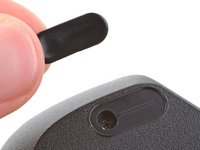
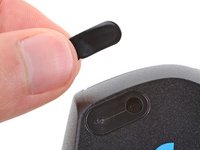
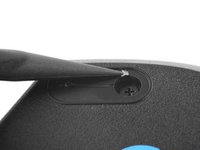
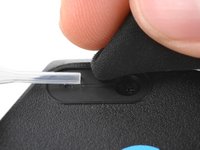
    2. Logitech G305 Feet Replacement: step 3, image 1 of 3 Logitech G305 Feet Replacement: step 3, image 2 of 3 Logitech G305 Feet Replacement: step 3, image 3 of 3
      • The feet have two layers—a rubberized one and an adhesive pad underneath.

      • If you're reusing the feet, be very careful not to separate the two layers or damage the feet.

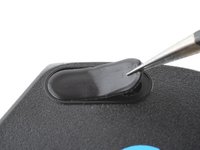
      • Carefully slide the point of a spudger under one of the feet, making sure it goes under both the foot and its adhesive pad.

      • If you're just removing the feet to open the mouse, you don't need to remove the circular one below the power switch.

      • Gently slide the spudger farther under the foot and lift to remove it.

      • If the rubber layer separates from its adhesive pad, use the same process to remove the pad.

      Ask FixBot

      Add Comment

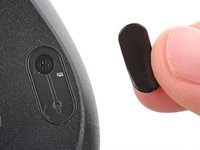
    3. Logitech G305 Feet Replacement: step 4, image 1 of 3 Logitech G305 Feet Replacement: step 4, image 2 of 3 Logitech G305 Feet Replacement: step 4, image 3 of 3
      • Repeat the previous step to remove the remaining feet.

      Ask FixBot

      Add Comment

    4. Logitech G305 Feet Replacement, Reassembly information: step 5, image 1 of 3 Logitech G305 Feet Replacement, Reassembly information: step 5, image 2 of 3 Logitech G305 Feet Replacement, Reassembly information: step 5, image 3 of 3
      • To install a new foot:

      • If any of the feet got damaged during removal or separated from their adhesive pads, replace them.

      • Use a spudger to carefully scrape up and remove any remaining adhesive bits.

      • If there's any adhesive residue left, use isopropyl alcohol and a microfiber cloth to remove it. Allow the surface to completely dry.

      • Remove the feet from their backing and firmly press them into place.

      Ask FixBot

      Add Comment

Conclusion

Repair didn’t go as planned? Try some basic troubleshooting, or ask our Answers community for help.

Cancel: I did not complete this guide.

One other person completed this guide.

Spencer Day

Member since: 09/14/22

207,002 Reputation

1,266 Guides authored

Team

iFixit Member of iFixit

Staff

121 Members

72,895 Guides authored

0 Guide Comments

Add Comment

View Statistics:

Past 24 Hours: 6

Past 7 Days: 48

Past 30 Days: 207

All Time: 3,948