
Logitech G29 Driving Force Paddle Assembly Replacement

Isaac Seagle and 2 other contributors
Last updated on Aug 16, 2024
Views: 9.9K
View statistics:
- Past 24 Hours:
- 15
- Past 7 Days:
- 65
- Past 30 Days:
- 358
- All Time:
- 9,924
Comments: 4
1 comment on steps, 3 guide comments.
Go to guide commentsCompleted: 5 6
5 people have marked this guide "completed." Will you be next?
6 people have marked this guide "completed." Including you — great job!
Favorites: 0 1
No one has favorited (and subscribed to) this guide. Will you be the first?
1 person has favorited (and subscribed to) this guide — and that's you!
Needs More Images
A few more images would make this guide's procedures crystal clear.
Introduction
Go to step 1 ↓This guide is to show how to replace the paddle assembly on the Logitech G29 Driving Force. The paddle assembly is responsible for shifting the car on the game up or down a gear.
This repair may be necessary if the car on the game is not shifting as that is crucial to this device. Have a good place to organize screws ready before doing this repair as there are a lot to take off. Make sure that the device is properly plugged and that it is still not working before tearing down the device.
What you need
Tools


-
-
-
Remove the six 32 mm hex screws from the faceplate of the steering wheel.
 Ask FixBot
-
-
-
Remove the six 10 mm #00 Phillips screws from the back of the steering wheel.
-
-
-
Carefully unplug the wire connector from the motherboard of the steering wheel.
-
-
-
Use a Phillips #1 screwdriver to remove the three 30 mm screws that are behind the steering wheel.
-
-
-
-
Gently pull the paddle assembly off from the base of the device and carefully thread the connector through the hole in the center.
-
-


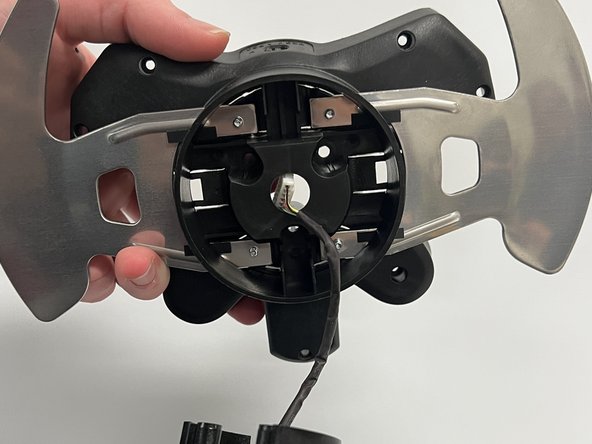
To reassemble your device, follow these instructions in reverse order.
Cancel: I did not complete this guide.
5 other people completed this guide.

Team

Western Carolina University, Team 1-5, Virtue Fall 2022 Member of Western Carolina University, Team 1-5, Virtue Fall 2022
WCU-VIRTUE-F22S1G5
4 Members
60 Guides authored
3 Guide Comments
Where can I buy the paddle assembly
@kevinjungh90689 have you found this out ? my paddle snapped off and I need to get a new one
@fizaanahmed Perhaps eBay?
