Introduction
This guide is to show how to replace the two force-feedback motors on the Logitech G29 Driving Force. The Force-feedback motors are what put the resistance on the steering wheel based on what is happening in the game. If these motors go out it can cause the steering wheel to not register the steering inputs that you are putting in.
What you need
-
-
-
Remove the six 32 mm hex screws from the faceplate of the steering wheel.
 Ask FixBot
-
-
-
Remove the six 10 mm #00 Phillips screws from the back of the steering wheel.
-
-
-
Carefully unplug the wire connector from the motherboard of the steering wheel.
-
-
-
Using the #2 Phillips head screwdriver remove the three 30mm long screws that are behind the steering wheel.
-
-
-
-
Remove the eight 15.9mm long silver screws on the bottom of the base of the wheel with a Phillips #1 screwdriver. (2 not circled covered by clamps in image)
-
-
-
Now remove the four 7.3mm long silver screws from the motherboard using a Phillips #2 screwdriver.
-
Then, carefully remove the seven plastic connectors from the motherboard. Make sure to avoid pulling by the wires and to only pull on the plastic
-
-
-
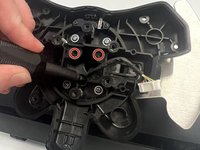
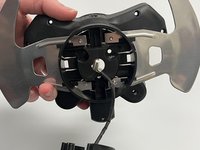
After removing the two screws on the metal bracket closest to the top edge of the circuit board where it connects the motor assembly to the base, carefully lift the dual motor assembly up and backwards, being careful with the connector that is threaded through the center.
-
-
-
Perhaps you came here because this spring fell out and you don't know where it goes?
-
This spring fits into a small channel with the bent edge upwards so that it serves to gently push the rack portion upwards against the pinion gear as the wheel rotates.
-
-
-
This is how the assembly should look when set back correctly. (My spring had fallen loose and I didn't know where it went back)
-
-




To reassemble your device, follow these instructions in reverse order.
Cancel: I did not complete this guide.
10 other people completed this guide.

Team

Western Carolina University, Team 1-5, Virtue Fall 2022 Member of Western Carolina University, Team 1-5, Virtue Fall 2022
WCU-VIRTUE-F22S1G5
4 Members
55 Guides authored
9 Guide Comments
how much is this part
where do u get repayment parts ?
Where can we find some replacments parts ?
I’d like to disconnect those two motors because at night, when my family is sleeping, they make a lot of noise and I really don’t want to wake anyone up.
Is it possible to open up the G29, cut or unplug those motor cables, and still have everything else work properly?
I added some steps to this to mention the spring underneath the rack and pinion gear after exposing the motor assembly.
