Free Shipping on Domestic Orders $75+

Logitech G213 Prodigy Adjustable Feet Replacement

What you need

  1. Logitech G213 Prodigy Adjustable Feet Replacement, Adjustable Feet: step 1, image 1 of 2 Logitech G213 Prodigy Adjustable Feet Replacement, Adjustable Feet: step 1, image 2 of 2
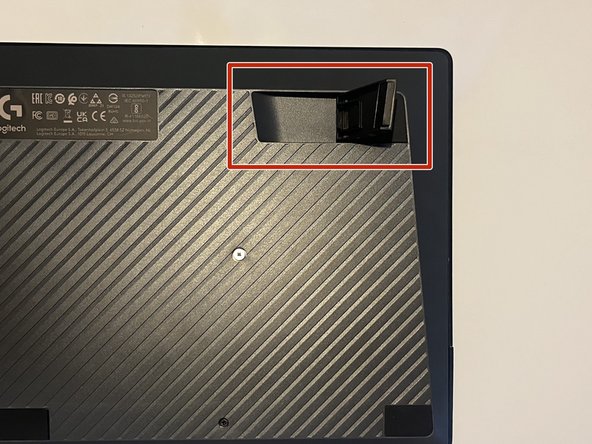
    • Flip the keyboard so the keys are facedown on a flat surface.

    • Locate both plastic feet on the top left and top right of the back board.

    Ask FixBot

    Add Comment

  2. Logitech G213 Prodigy Adjustable Feet Replacement: step 2, image 1 of 2 Logitech G213 Prodigy Adjustable Feet Replacement: step 2, image 2 of 2
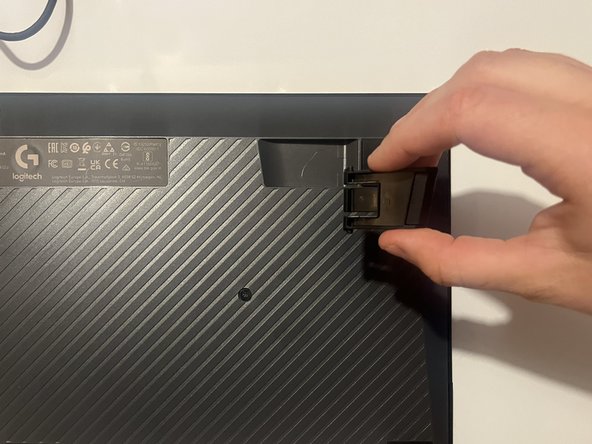
    • Lift the foot into a fully open position.

    • The foot should press flat against the outer edge of its socket.

    Ask FixBot

    Add Comment

  3. Logitech G213 Prodigy Adjustable Feet Replacement: step 3, image 1 of 2 Logitech G213 Prodigy Adjustable Feet Replacement: step 3, image 2 of 2
    • Gently but firmly squeeze the sides of the foot until it pops out of place.

    Ask FixBot

    Add Comment

Conclusion

To reassemble your device, follow these instructions in reverse order.

Cancel: I did not complete this guide.

Charlie Branch

Member since: 09/04/24

98 Reputation

1 Guide authored

0 Guide Comments

Add Comment

View Statistics:

Past 24 Hours: 3

Past 7 Days: 10

Past 30 Days: 75

All Time: 809