Free Shipping on Domestic Orders $75+

Logitech G Pro X Superlight Scroll Wheel Replacement

What you need

    1. Logitech G Pro X Superlight Scroll Wheel Replacement, Scroll Wheel: step 1, image 1 of 3 Logitech G Pro X Superlight Scroll Wheel Replacement, Scroll Wheel: step 1, image 2 of 3 Logitech G Pro X Superlight Scroll Wheel Replacement, Scroll Wheel: step 1, image 3 of 3
      Tool used on this step:
      Tweezers
      $4.99
      Buy
      • Mouse skates will be damaged during this process. Having a new pair of mouse skates is STRONGLY recommended.

      • Use tweezers to peel off the mouse skates on the underside of the mouse.

      Ask FixBot

      Add Comment

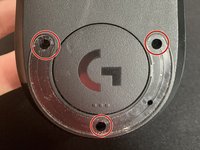
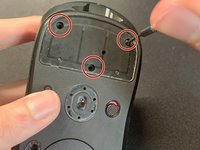
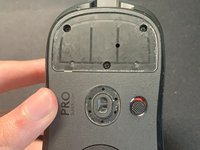
    2. Logitech G Pro X Superlight Scroll Wheel Replacement: step 2, image 1 of 2 Logitech G Pro X Superlight Scroll Wheel Replacement: step 2, image 2 of 2
      • Unscrew the six screws using a 1.6mm Phillips screwdriver on the top and bottom side of the mouse.

      Ask FixBot

      Add Comment

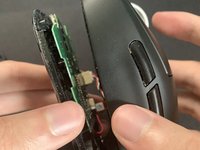
    3. Logitech G Pro X Superlight Scroll Wheel Replacement: step 3, image 1 of 2 Logitech G Pro X Superlight Scroll Wheel Replacement: step 3, image 2 of 2
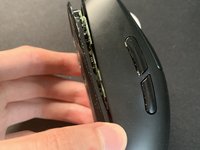
      • Open the bottom shell with your hands.

      • Use caution, as wires are still intact.

      • The bottom shell should come off easily without applying any force.

      Ask FixBot

      Add Comment

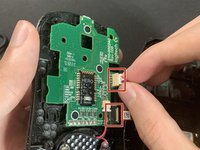
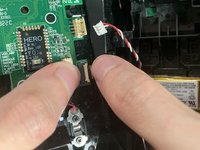
    4. Logitech G Pro X Superlight Scroll Wheel Replacement: step 4, image 1 of 2 Logitech G Pro X Superlight Scroll Wheel Replacement: step 4, image 2 of 2
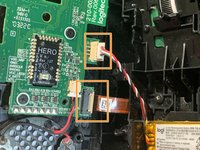
      • Disconnect the wires and cables in contact with the sensor's motherboard.

      • Pull and shake evenly on the cable to make sure cables are not strained. Avoid pulling heavily.

      Ask FixBot

      Add Comment

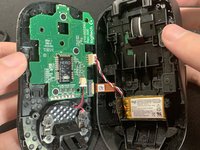
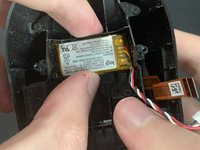
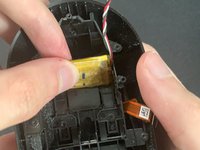
    5. Logitech G Pro X Superlight Scroll Wheel Replacement: step 5, image 1 of 2 Logitech G Pro X Superlight Scroll Wheel Replacement: step 5, image 2 of 2
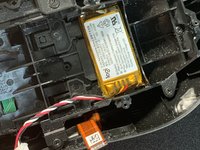
      • Take out the battery located at the back of the mouse.

      • Flipping it upside down helps when removing it.

      Ask FixBot

      Add Comment

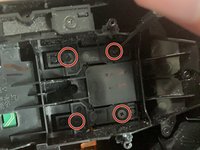
    6. Logitech G Pro X Superlight Scroll Wheel Replacement: step 6, image 1 of 2 Logitech G Pro X Superlight Scroll Wheel Replacement: step 6, image 2 of 2
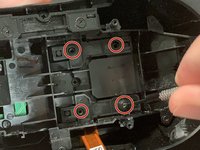
      • Remove four screws at the bottom part of the mouse with a 1.6mm screwdriver.

      Ask FixBot

      Add Comment

    7. Logitech G Pro X Superlight Scroll Wheel Replacement: step 7, image 1 of 2 Logitech G Pro X Superlight Scroll Wheel Replacement: step 7, image 2 of 2
      • Carefully take out the left and right mouse buttons.

      Ask FixBot

      Add Comment

    8. Logitech G Pro X Superlight Scroll Wheel Replacement: step 8, image 1 of 2 Logitech G Pro X Superlight Scroll Wheel Replacement: step 8, image 2 of 2
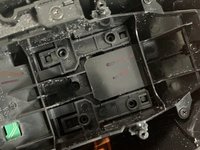
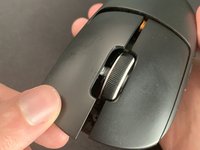
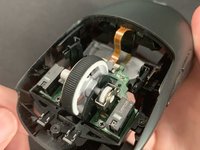
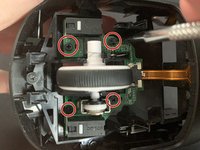
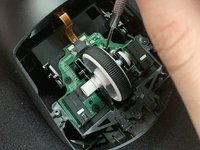
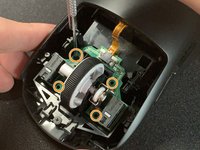
      • Remove the four screws attached to the scroll wheel.

      Ask FixBot

      Add Comment

    9. Logitech G Pro X Superlight Scroll Wheel Replacement: step 9, image 1 of 2 Logitech G Pro X Superlight Scroll Wheel Replacement: step 9, image 2 of 2
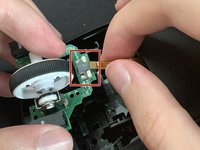
      • Apply pressure and shake evenly to remove the attached cable.

      • The scroll wheel comes off easily without using too much pressure.

      • Insert the new scroll wheel and line up against the sensor.

      Ask FixBot

      Add Comment

    10. Logitech G Pro X Superlight Scroll Wheel Replacement: step 10, image 1 of 3 Logitech G Pro X Superlight Scroll Wheel Replacement: step 10, image 2 of 3 Logitech G Pro X Superlight Scroll Wheel Replacement: step 10, image 3 of 3
      • Reattach the cable.

      • Refasten the four screws.

      Ask FixBot

      Add Comment

    11. Logitech G Pro X Superlight Scroll Wheel Replacement: step 11, image 1 of 3 Logitech G Pro X Superlight Scroll Wheel Replacement: step 11, image 2 of 3 Logitech G Pro X Superlight Scroll Wheel Replacement: step 11, image 3 of 3
      • Use a pair of tweezers to reinsert the four screws at the bottom half of the mouse and tighten with a screwdriver.

      • Attach the battery back on the bottom half of the mouse.

      • Reattach the two cables.

      Ask FixBot

      Add Comment

    12. Logitech G Pro X Superlight Scroll Wheel Replacement: step 12, image 1 of 3 Logitech G Pro X Superlight Scroll Wheel Replacement: step 12, image 2 of 3 Logitech G Pro X Superlight Scroll Wheel Replacement: step 12, image 3 of 3
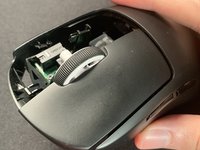
      • Line up the bottom shell with the top shell and connect them together.

      • Reapply the four screws back onto the mouse.

      Ask FixBot

      Add Comment

    13. Logitech G Pro X Superlight Scroll Wheel Replacement: step 13, image 1 of 1
      • Put on your new mouse skates.

      • Apply pressure so that they stick to the mouse, leaving no air gap.

      Ask FixBot

      Add Comment

Finish Line

Cancel: I did not complete this guide.

9 other people completed this guide.

Zane

Member since: 07/27/23

487 Reputation

1 Guide authored

6 Guide Comments

Thanks for publishing this!
Do you replace only plastic part of wheel or plastic wheel + PCB?
Where do you order new wheel?

Andriy Legayev - Reply Share
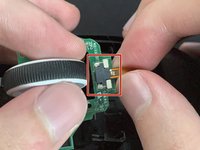
https://ausmodshop.com/products/modded-l... pricy, but they have full replacement pcbs with all the parts installed for you so you

Daniel G - Reply Share
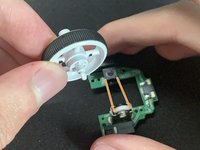
I don't think the soft black part is separable for the original wheel. Ordered an 'original' (or mostly original 🙂) wheel at one famous giant Chinese marketplace for 6 USD, item id 1005006217893341 - couldn't find any difference

V S - Reply Share

Thanks for the guide. Didn't need a new scroll wheel, but the disassembly guide was great.

Uber Beast - Reply Share

Thanks for the guide. Some steps are not necessary if your purpose is just to change the wheel

V S - Reply Share

Add Comment

View Statistics:

Past 24 Hours: 55

Past 7 Days: 380

Past 30 Days: 1,568

All Time: 89,509