Introduction
Logitech Pro Wired Gaming Mouse model M-U0052 was once a staple in the e-sports world, but the scroll wheels often have issues. This guide will instruct you on how to disassemble, remove, clean, replace, and further understand your mouse wheel.
Overall, the process is easy, quick, and only requires a screwdriver and a small prying tool. Additionally, this may be a good opportunity to replace old mouse feet, which requires purchasing replacement skates.
If you love your old Logitech Pro Wired mouse, replacing its mouse wheel is a hassle-free, quick process!
Before you begin the repair, disconnect your mouse from your computer.
What you need
-
-
Use a Phillips #0 screwdriver to remove the three 3.0 mm screws from the bottom of the mouse.
-
-
-
-
Use a dust blower or compressed air to clean the mouse wheel area of debris and gunk.
-
If that doesn't work, use a dry toothbrush or other small brush to break up debris, then use the dust blower again.
-
Apply a couple of drops of 90%+ isopropyl alcohol to the tip of a cotton swab and use it to clean the area.
-
-
-
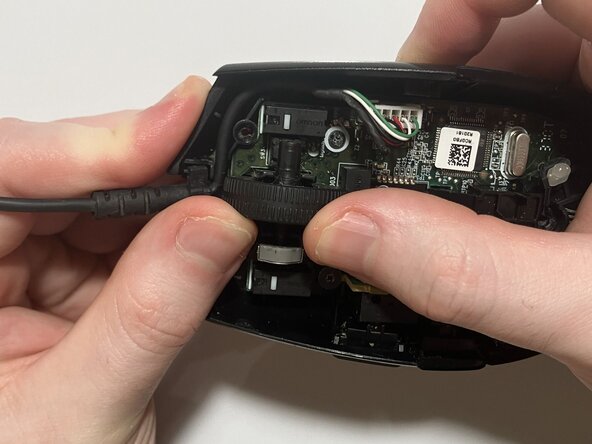
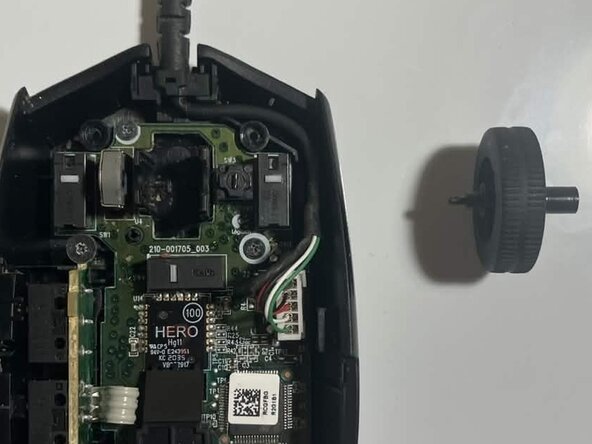
To remove the mouse wheel, apply moderate pressure from the left side of the mouse wheel to pop it out.
-

 Ask FixBot





When putting your mouse back together, make sure your cord is properly seated and parts align properly. The chassis should come back together easily, then screw the screws back in where they belong.
If you want your mouse to more properly glide on surfaces after removing your mouse feet, you may need to install replacement feet, otherwise known as skates. The G Pro Wired model shares skate designs with the G102 and G203 models, which you can easily find online for ~$5-12.
Take your e-waste to an R2 or e-Stewards certified recycler.
Thank you for using this guide!

Team

Austin Community College, Team A-3, Serna Spring 2026 Member of Austin Community College, Team A-3, Serna Spring 2026
AUSTINCC-SERNA-S26SAG3
1 Member
1 Guide authored
