
Logitech Dual Action Joystick Replacement

Brian Neuman and 6 other contributors
Last updated on Jun 28, 2024
Views: 15K
View statistics:
- Past 24 Hours:
- 4
- Past 7 Days:
- 57
- Past 30 Days:
- 232
- All Time:
- 15,125
Comments: 7
2 comments on steps, 5 guide comments.
Go to guide commentsCompleted: 29 30
29 people have marked this guide "completed." Will you be next?
30 people have marked this guide "completed." Including you — great job!
Favorites: 6 7
6 people have favorited (and subscribed to) this guide. Will you be next?
7 people have favorited (and subscribed to) this guide — including you!
Slice and Dice
The steps in this guide should be split up and made into a series of prerequisite guides.
Introduction
Go to step 1 ↓If the joystick on your Logitech Dual Action controller isn't working properly, refer to the guide to walk you through how to replace the joystick on your Logitech Dual Action controller.
The joystick is an essential part of any controller. A faulty joystick will result in difficulty navigating any software you may encounter where you will need the joystick.
Ensure your controller is disconnected from the power source before beginning your replacement.
What you need
Tools


-
-
-
To get into the controller, you will need to unscrew the 7 screws on the back.
-
You will have to remove the bottom oval sticker to reveal the screw marked with orange.
 Ask FixBot
-
-
-
With the screws removed, turn the controller upside down and separate the front end from the back end.
-
-
-
-
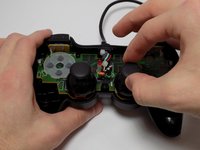
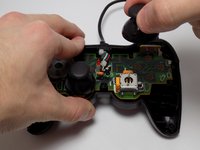
With the case off, the joysticks can be removed by pulling them upward.
-
To put the replacement joystick on, align the hole at the bottom of the joystick with the rectangular peg and gently push down.
-
-


Cancel: I did not complete this guide.
29 other people completed this guide.

Team

USF Tampa, Team 7-4, Remmell Winter 2015 Member of USF Tampa, Team 7-4, Remmell Winter 2015
USFT-REMMELL-W15S7G4
4 Members
36 Guides authored
5 Guide Comments
Can the Analogue Stick be replaced with the One of XBOX 360 or PS3 Controller
If you need sticks look for small holed ones like these.
Merci pour le site.excusez moi pour le dérangement j'ai ma manette PS2 qui ne fonctionne pas quand je branche ça me dit que c'est pas connecté
