Free Shipping on Domestic Orders $75+

Logitech Dexxa Joystick Secondary Button Cap Replacement

What you need

  1. Logitech Dexxa Joystick Secondary Button Cap Replacement, Trigger Cap: step 1, image 1 of 3 Logitech Dexxa Joystick Secondary Button Cap Replacement, Trigger Cap: step 1, image 2 of 3 Logitech Dexxa Joystick Secondary Button Cap Replacement, Trigger Cap: step 1, image 3 of 3
    • Unplug your Joystick before use.

    • Remove the three 2 mm screws on the right panel.

    • Remove the right cover panel

    • Open the joystick

    • Open gently to prevent the joystick from falling apart

    Ask FixBot

    Add Comment

  2. Logitech Dexxa Joystick Secondary Button Cap Replacement: step 2, image 1 of 2 Logitech Dexxa Joystick Secondary Button Cap Replacement: step 2, image 2 of 2
    • Remove the top panel

    • Remove the button cap

    Ask FixBot

    Add Comment

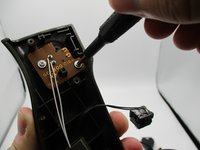
  3. Logitech Dexxa Joystick Secondary Button Cap Replacement, Secondary Button Cap: step 3, image 1 of 3 Logitech Dexxa Joystick Secondary Button Cap Replacement, Secondary Button Cap: step 3, image 2 of 3 Logitech Dexxa Joystick Secondary Button Cap Replacement, Secondary Button Cap: step 3, image 3 of 3
    • Unscrew the two silver 1 mm screws

    • Remove the circuit board

    • Push the purple secondary button cap out from its slot

    Ask FixBot

    Add Comment

Conclusion

To reassemble your device, follow these instructions in reverse order.

Cancel: I did not complete this guide.

Addison

Member since: 08/30/19

3,108 Reputation

17 Guides authored

0 Guide Comments

Add Comment

View Statistics:

Past 24 Hours: 1

Past 7 Days: 3

Past 30 Days: 17

All Time: 202