
Logitech C920 Webcam Disassembly

Jose Gustavo Abreu Murta and 3 other contributors
Last updated on Jun 29, 2023
Views: 74K
View statistics:
- Past 24 Hours:
- 32
- Past 7 Days:
- 127
- Past 30 Days:
- 550
- All Time:
- 74,078
Comments: 86
54 comments on steps, 32 guide comments.
Go to guide commentsCompleted: 43 44
43 people have marked this guide "completed." Will you be next?
44 people have marked this guide "completed." Including you — great job!
Favorites: 5 6
5 people have favorited (and subscribed to) this guide. Will you be next?
6 people have favorited (and subscribed to) this guide — including you!
Bullets!
Better coordination with markups and the color/type of bullets will help make this guide more clear!
Community-Contributed Guide
An awesome member of our community made this guide. It was not created by iFixit staff.
Better Introduction
Improve this guide by completing or revising its introduction.
What you need
-
-
-
On the bottom side of the webcam, remove the stickers from both sides
 Ask FixBot
-
-
-
Remove the four Phillips screws.
-
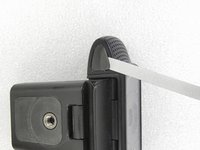
Press into the holes to unlock the side covers.
-
-
-
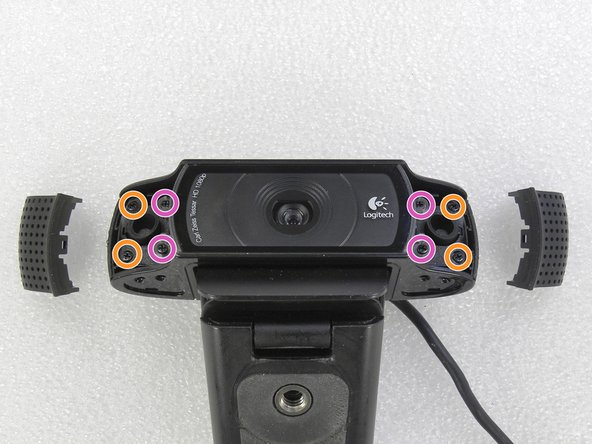
Once you’ve removed the side covers, unscrew all eight Phillips screws highlighted.
-
-
-
Remove the lens's cover.
-
Remove the five Phillips screws of the metal bracket.
-
Remove the rubber pieces of both microphones (one on each side).
-
-
-
Carefully remove the base of the plastic support. Loosen the three screws that secure the electronic circuit.
-
-
-
-
Release the clip that secures the cable holder. Pull this cable holder out of the camera.
-
-
-
The problem was the broken cable on the back of the camera. I've cut the faulty part and redid the connections by soldering them and insulated them with heat shrink tubes.
-
-
-
The repaired cable is reattached to the camera. Wrapped it with some masking tape. Camera tested: OK!
-
Assemble the webcam following the steps in a reverse order.
-
-





To reassemble your device, follow these instructions in reverse order.
Cancel: I did not complete this guide.
43 other people completed this guide.
Special thanks to these translators:
100%


These translators are helping us fix the world! Want to contribute?
Start translating ›

32 Guide Comments
Excellent! Helped me figure out how to get the base off to mount it to an ikea worklamp as a hacky boom.
Can you post a guide or technique of the process?
Or share some photos? (On meta.ifixit.com)
Cory,
I did not understand your question.
This repair guide contains several photos.
thanks for an excellent guide . I am now more positive that it is something I can perform now. Many thanks
im having trouble releasing the 4 screws on step 3!!! the screw driver keeps slipping and i’ve tried a few and another webcam…
