Free Shipping on Domestic Orders $75+

Lexibook Junior Tablet Speaker Replacement

What you need

  1. Lexibook Junior Tablet Speaker Replacement, Battery: step 1, image 1 of 1
    • Make sure your device is powered off before replacement to prevent electric shock.

    • With the device screen face down, use the metal spudger to remove the small rubber circles on all four corners of the device. The screws should now be revealed.

    • Using the metal spudger, pry open the small, long rubber rectangle on the back of the device to reveal more screws.

    Ask FixBot

    Add Comment

  2. Lexibook Junior Tablet Speaker Replacement: step 2, image 1 of 1
    • Using a Phillips #00 screwdriver, remove the four 6.8mm screws from the four corners of the device.

    • Using the same screwdriver, remove the three screws that were behind the rubber rectangle. These screws do not come out of the device.

    • Use the plastic opening tool to gently pry open the back panel of the tablet.

    Ask FixBot

    Add Comment

  3. Lexibook Junior Tablet Speaker Replacement: step 3, image 1 of 1
    • Use the nylon spudger to gently pry under the battery to remove it.

    • Make sure you do not damage the battery or metal plate in this process and only use a nylon spudger. Be patient and work slowly for the best results.

    Ask FixBot

    Add Comment

  4. Lexibook Junior Tablet Speaker Replacement: step 4, image 1 of 1
    • Use a soldering iron to remove the battery from the motherboard safely.

    • For advice on how to solder, check out iFixit's Soldering Guide.

    Ask FixBot

    Add Comment

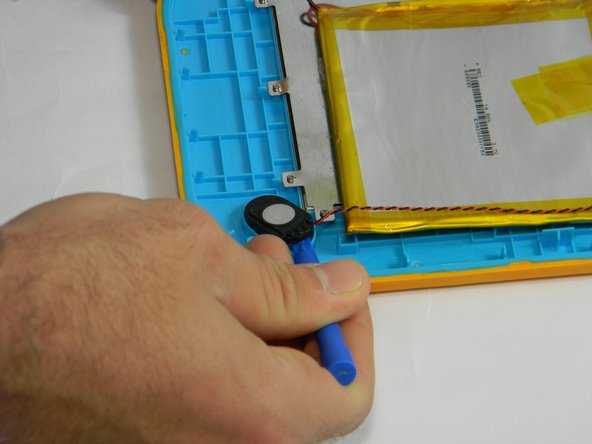
  5. Lexibook Junior Tablet Speaker Replacement, Speaker: step 5, image 1 of 2 Lexibook Junior Tablet Speaker Replacement, Speaker: step 5, image 2 of 2
    • Using the plastic opening tool, gently pry the speaker out of its plastic housing.

    Ask FixBot

    Add Comment

  6. Lexibook Junior Tablet Speaker Replacement: step 6, image 1 of 1
    Ask FixBot

    Add Comment

Conclusion

To reassemble your device, follow these instructions in reverse order.

Cancel: I did not complete this guide.

Rachel Klesius

Member since: 09/19/16

645 Reputation

6 Guides authored

Team

USF Tampa, Team 17-3, Blackwell Fall 2016 Member of USF Tampa, Team 17-3, Blackwell Fall 2016

USFT-BLACKWELL-F16S17G3

4 Members

12 Guides authored

0 Guide Comments

Add Comment

View Statistics:

Past 24 Hours: 1

Past 7 Days: 4

Past 30 Days: 16

All Time: 421