Introduction
Does your Levoit LV-H132 have increased noise when it's switched on, have decreased airflow, have unusual odors, or a visibly clogged filter? If so, use this guide to replace the filter. This repair is necessary so that the air filters are functioning as intended. There are no required tools to access or change the filter. Before starting, make sure the device is unplugged. By the end of this guide your device will work better.
-
-
-
Orient your air purifier so that the control panel faces the bottom and the filter cover faces towards you.
-
Rotate the filter cover counterclockwise to separate the filter cover from the unit.
 Ask FixBot
-
-
-
-
By grabbing the two white tabs on each side, pull the tab upwards to remove the filter.
-
-


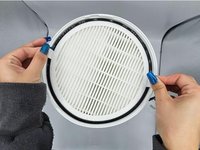
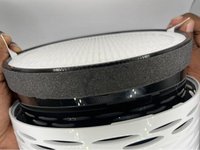
To reassemble your device, follow these instructions in reverse order.
Cancel: I did not complete this guide.
2 other people completed this guide.

Team

University of North Texas, Team 2-3, Harold Fall 2023 Member of University of North Texas, Team 2-3, Harold Fall 2023
UNT-HAROLD-F23S2G3
4 Members
60 Guides authored
