
Lenovo Yoga 2 11" Battery Replacement

Abbey Hickmann and 7 other contributors
Last updated on May 7, 2024
Views: 28K
View statistics:
- Past 24 Hours:
- 6
- Past 7 Days:
- 38
- Past 30 Days:
- 137
- All Time:
- 27,906
Comments: 6
2 comments on steps, 4 guide comments.
Go to guide commentsCompleted: 12 13
12 people have marked this guide "completed." Will you be next?
13 people have marked this guide "completed." Including you — great job!
Favorites: 0 1
No one has favorited (and subscribed to) this guide. Will you be the first?
1 person has favorited (and subscribed to) this guide — and that's you!
Introduction
Go to step 1 ↓As time passes, a battery loses its capability to hold a single charge. This guide will aide users in removing the back panel to reach and replace the faulty battery. Remember to turn the laptop off prior to the repair.
What you need
Parts

Tools


-
-
-
With a T5 Torx screwdriver, remove ten 6.35 mm screws from the back of the laptop.
 Ask FixBot
-
-
-
-
-
Once you have completed the prerequisite guide, locate the battery of the laptop. Remember to disconnect the battery.
-
-
-
Using a #00 Philips Precision Screwdriver, remove the seven 3.175mm screws that hold the battery in place (six on the outside, one in the middle).
-
-
-
Tool used on this step:Tweezers$4.99
-
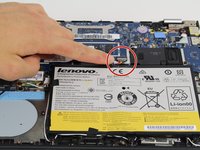
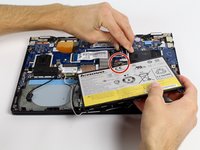
There will be a clip that connects the battery to the rest of the laptop. Unclasp this clip by inserting tweezers into the connection to completely free the battery.
-
-
-
Once all of the wires are detached, carefully remove the battery and replace.
-
-



To reassemble your device, follow these instructions in reverse order.
Cancel: I did not complete this guide.
12 other people completed this guide.

Team

Cal Poly, Team 4-3, Maness Fall 2015 Member of Cal Poly, Team 4-3, Maness Fall 2015
CPSU-MANESS-F15S4G3
4 Members
60 Guides authored
4 Guide Comments
how do I remove unathorized battery error?
POOR INSTRUCTIONS
You have failed to mention that the battery cable is attached by a clip that requires opening.
Terrible.
You just took pictures of unscrewing. Not Useful.
