Free Shipping on Domestic Orders $75+

Lenovo Yoga 2 11" 20428 Bluetooth Module Replacement

What you need

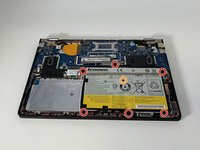
    1. Lenovo Yoga 2 11" 20428 Bluetooth Module Replacement, Back Panel: step 1, image 1 of 3 Lenovo Yoga 2 11" 20428 Bluetooth Module Replacement, Back Panel: step 1, image 2 of 3 Lenovo Yoga 2 11" 20428 Bluetooth Module Replacement, Back Panel: step 1, image 3 of 3
      • Flip the computer over so the bottom is facing up.

      • Remove the ten 6mm screws with a T5 Torx security screwdriver.

      Ask FixBot

      Add Comment

    2. Lenovo Yoga 2 11" 20428 Bluetooth Module Replacement: step 2, image 1 of 1
      • Carefully remove the back panel by gently separating the panel from front to back.

      • Take care not to pull any wires or crack the outer shell.

      Ask FixBot

      Add Comment

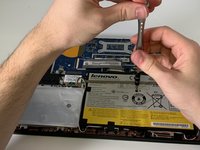
    1. Lenovo Yoga 2 11" 20428 Bluetooth Module Replacement, Battery: step 3, image 1 of 3 Lenovo Yoga 2 11" 20428 Bluetooth Module Replacement, Battery: step 3, image 2 of 3 Lenovo Yoga 2 11" 20428 Bluetooth Module Replacement, Battery: step 3, image 3 of 3
      • Use the Phillips #000 screwdriver to remove the six 3.3 mm screws around the perimeter of the battery.

      • Use the Phillips #000 screwdriver to remove the single 6.75 mm screw from the center of the battery.

      Ask FixBot

      Add Comment

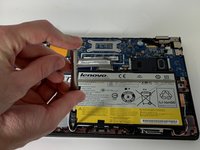
    2. Lenovo Yoga 2 11" 20428 Bluetooth Module Replacement: step 4, image 1 of 1
      • Gently remove the three pieces of tape securing the Bluetooth/Wi-Fi antenna.

      Ask FixBot

      Add Comment

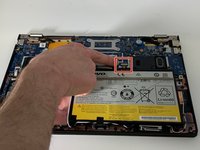
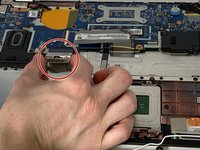
    3. Lenovo Yoga 2 11" 20428 Bluetooth Module Replacement: step 5, image 1 of 2 Lenovo Yoga 2 11" 20428 Bluetooth Module Replacement: step 5, image 2 of 2
      • Grip the base of the connector with your fingers or pliers, and gently pull the connector straight back towards you to remove it.

      • If possible, do not to pull the connector out by the wires, as this can damage the connector.

      Ask FixBot

      Add Comment

    4. Lenovo Yoga 2 11" 20428 Bluetooth Module Replacement: step 6, image 1 of 2 Lenovo Yoga 2 11" 20428 Bluetooth Module Replacement: step 6, image 2 of 2
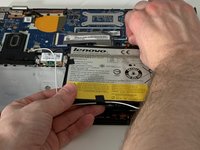
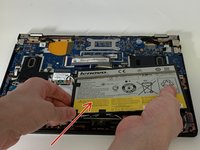
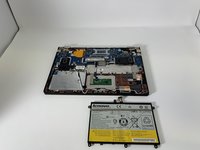
      • Carefully remove the battery from the laptop.

      • Take care not to pull out the Bluetooth antenna while removing the battery.

      Ask FixBot

      Add Comment

    1. Lenovo Yoga 2 11" 20428 Bluetooth Module Replacement, Bluetooth Module: step 7, image 1 of 1
      • Use the Phillips #000 screwdriver to remove the two 3.3 mm screws.

      Ask FixBot

      Add Comment

    2. Lenovo Yoga 2 11" 20428 Bluetooth Module Replacement: step 8, image 1 of 2 Lenovo Yoga 2 11" 20428 Bluetooth Module Replacement: step 8, image 2 of 2
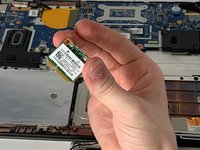
      • Gently grab and remove the Bluetooth module.

      Ask FixBot

      Add Comment

Conclusion

To reassemble your device, follow these instructions in reverse order.

Cancel: I did not complete this guide.

2 other people completed this guide.

0 Guide Comments

Add Comment

View Statistics:

Past 24 Hours: 0

Past 7 Days: 9

Past 30 Days: 42

All Time: 1,318