This translation was generated by a machine and has not been reviewed by a person yet. Speak this language? Review it.
What you need
-
-
-
First of all, you should have backed up your personal data, for example to an external USB drive, in particular your My Documents etc or /home
-
Switch off, close the lid and turn the computer over.
-
On the left side, identify the screw with a cylinder symbol next to it. This retains the hard disk cover.
 Ask FixBot
-
-
-
-
Remove the screw from the disk drive bay cover.
-
Remove the cover, lifting it and gently pulling it to the left.
-
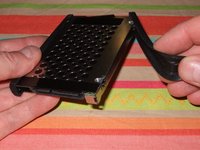
Pull on the black plastic tab to extract the hard drive.
-
-
-
Remove the protective rubber side pieces.
-
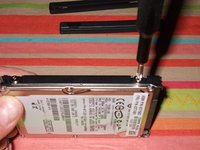
Remove the four screws.
-
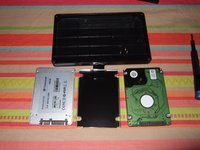
Remove the drive from the enclosure.
-
You are ready to install the SSD into the enclosure and reassemble everything.
-
-


To reassemble your PC , proceed in the reverse order
Cancel: I did not complete this guide.
5 other people completed this guide.
Special thanks to these translators:
100%


These translators are helping us fix the world! Want to contribute?
Start translating ›


