
Lenovo V15 G2 IJL RAM Replacement

Javier del Olmo and 4 other contributors
Last updated on May 28, 2026
Views: 342
View statistics:
- Past 24 Hours:
- 4
- Past 7 Days:
- 29
- Past 30 Days:
- 112
- All Time:
- 342
Comments: 0
No one has left comments on this guide. Will you be first?
Go to guide commentsCompleted: 0 1
No one has marked this guide "completed." Will you be the first?
1 person has marked this guide "completed." It's you — great job!
Favorites: 0 1
No one has favorited (and subscribed to) this guide. Will you be the first?
1 person has favorited (and subscribed to) this guide — and that's you!
Introduction
Go to step 1 ↓Use this guide to replace or upgrade the RAM (Random Access Memory) in your Lenovo V15 G2 IJL laptop.
This repair is important because the RAM plays a critical role in your laptop’s performance. It temporarily stores data that the system needs to access quickly, allowing applications to run smoothly and enabling efficient multitasking.
If your laptop is experiencing slow performance, frequent freezing, or difficulty handling multiple applications at once, insufficient or faulty RAM may be the cause. Upgrading or replacing the RAM can significantly improve system responsiveness and overall performance.
Before proceeding, you can check your current memory usage through your operating system or run Lenovo Diagnostics to verify whether the installed RAM is functioning properly. If the memory fails diagnostics or does not meet your performance needs, replacing or upgrading it can restore optimal operation.
What you need
Tools


-
-
-
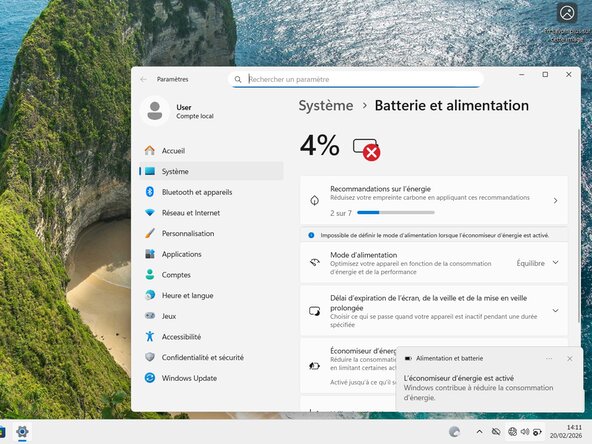
Let the laptop’s battery level drop below 25% before beginning the repair, as a fully charged battery could pose a fire risk if damaged.
-
Disconnect all cables and completely power off the laptop.
 Ask FixBot
-
-
-
Use a Phillips #00 screwdriver to remove the screws securing the back cover.
-
Seven 6.7 mm-long screws.
-
Four 3.8 mm-long screws.
-
-
-
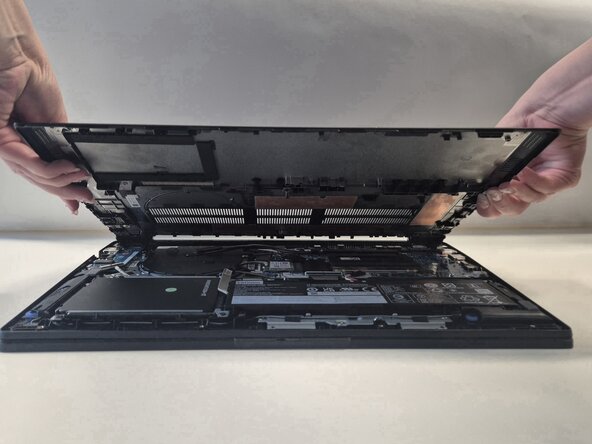
Insert an opening pick between the upper-right corner of the back cover and the frame.
-
-
-
-
-
Insert your fingernail into the small notch at the base of the connector.
-
Unplug the battery connector cable with your fingers.
-
-
-
-






To reassemble your device, follow these instructions in reverse order.
Check your repair by running hardware tests with Lenovo Diagnostics.
Take your e-waste to an R2 or e-Stewards certified recycler.
Repair didn’t go as planned? Try some basic troubleshooting, or ask our Answers community for help.

Team

Université Paris Cité, Team 1-1, Grohan Winter 2026 Member of Université Paris Cité, Team 1-1, Grohan Winter 2026
UPARIS-GROHAN-W26S1G1
4 Members
72 Guides authored
