
Lenovo Thinkpad Tablet 1838 Touch Screen Replacement

Michael Gaskey and 7 other contributors
Last updated on Jan 3, 2023
Views: 1.4K
View statistics:
- Past 24 Hours:
- 2
- Past 7 Days:
- 15
- Past 30 Days:
- 83
- All Time:
- 1,389
Comments: 0
No one has left comments on this guide. Will you be first?
Go to guide commentsCompleted: 1 2
1 person has marked this guide "completed." Will you be next?
2 people have marked this guide "completed." Including you — great job!
Favorites: 0 1
No one has favorited (and subscribed to) this guide. Will you be the first?
1 person has favorited (and subscribed to) this guide — and that's you!
Introduction
Go to step 1 ↓This guide will show you how to replace the touch screen on the Lenovo ThinkPad Tablet 1838.
The touch screen is what allows the users to see images and interact with them with the usage of their fingertips. In the case that these attributes are compromised, such as if the screen is cracked or stopped displaying, replacement of the screen may be needed.
If replacing a glass cracked screen, be cautious of little shards of glass that may be harmful to your body. You can place tape over the screen to make sure that all the pieces of glass are secure.
Before using this guide to aid with the replacement of the screen, make sure that device is unplugged and powered off.
What you need
Tools
-
Spudger4.9


-
-
-
Use an opening tool to pry open and disconnect the screen from the rest of the tablet.
-
-
-
Open the tablet screen to the left, making sure not to disconnect any of the wires connecting the screen to the tablet.
-
-
-
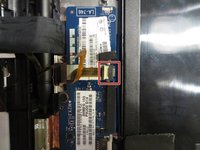
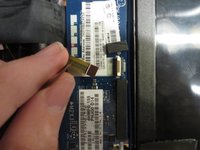
Disconnect the ribbon connector by pulling up on the white gate.
-
Then just simply pull the wire to the left to disconnect it.
-
-
-
-
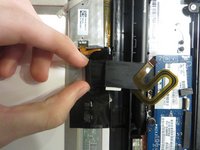
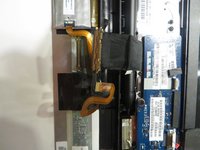
Disconnect the last ribbon connector using your fingernails to grip the ends of the connector and gently pull to the left.
-

 Ask FixBot





To reassemble your device, follow these instructions in reverse order.
Cancel: I did not complete this guide.
One other person completed this guide.

Team

University of North Texas, Team S1-G2, Riccardelli Fall 2018 Member of University of North Texas, Team S1-G2, Riccardelli Fall 2018
UNT-RICCARDELLI-F18S1G2
4 Members
48 Guides authored
