
Lenovo Thinkpad T440s Back Panel Replacement

Terelle Montalvo and 2 other contributors
Last updated on Nov 30, 2020
Views: 2.5K
View statistics:
- Past 24 Hours:
- 1
- Past 7 Days:
- 21
- Past 30 Days:
- 76
- All Time:
- 2,474
Comments: 4
4 comments on steps.
Completed: 2 3
2 people have marked this guide "completed." Will you be next?
3 people have marked this guide "completed." Including you — great job!
Favorites: 0 1
No one has favorited (and subscribed to) this guide. Will you be the first?
1 person has favorited (and subscribed to) this guide — and that's you!
Introduction
Go to step 1 ↓In order to access and replace the laptops components, the backplate must be removed. For this guide, you will need a prying tool and a Phillips #1 screwdriver. This process is not difficult but is required for most of this laptops repairs.
What you need
Tools


-
-
-
Make sure to power down and turn off your device before proceeding with the repair.
-
Flip your laptop over so that the backside is facing you.
 Ask FixBot
-
-
-
Using a Phillips #1 screwdriver, remove the eight screws securing the backplate.
-
Don’t try to force screws which won't come out. They are held in place by a stopper on the reverse side. This will not prevent you from removing the backplate.
-
-
-
-
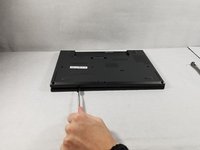
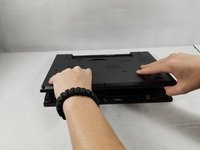
Using the metal spudger, wedge it in the seam where the backplate meets the front plate and run the tool along the seam to separate the backplate.
-
-



To reassemble your device, follow these instructions in reverse order.
Cancel: I did not complete this guide.
2 other people completed this guide.

Team

UMass Dartmouth, Team S1-G5, Simcock Fall 2018 Member of UMass Dartmouth, Team S1-G5, Simcock Fall 2018
UMASSD-SIMCOCK-F18S1G5
3 Members
96 Guides authored
