Free Shipping on Domestic Orders $75+

Lenovo Thinkpad E540 RAM Replacement

What you need

    1. Lenovo Thinkpad E540 RAM Replacement, Battery: step 1, image 1 of 2 Lenovo Thinkpad E540 RAM Replacement, Battery: step 1, image 2 of 2
      • Push the battery release switches away from each other.

      Ask FixBot

      Add Comment

    2. Lenovo Thinkpad E540 RAM Replacement: step 2, image 1 of 1
      • Remove the battery.

      Ask FixBot

      Add Comment

    1. Lenovo Thinkpad E540 RAM Replacement, Disassembly of the Back Panel: step 3, image 1 of 1
      • Remove the three 1.2mm Phillips #00 screws from the bottom panel.

      Ask FixBot

      Add Comment

    2. Lenovo Thinkpad E540 RAM Replacement: step 4, image 1 of 1
      • Use a plastic opening tool to pry off the bottom panel.

      Ask FixBot

      Add Comment

    1. Lenovo Thinkpad E540 RAM Replacement, RAM: step 5, image 1 of 1
      • Release the tabs on each side of the chip by simultaneously pushing each tab away from the RAM.

      • These tabs lock the chip in place and releasing them will cause the chip to "pop" up.

      Ask FixBot

      Add Comment

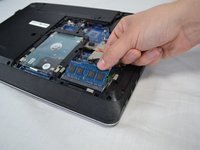
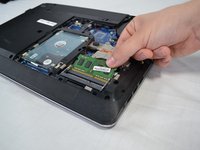
    2. Lenovo Thinkpad E540 RAM Replacement: step 6, image 1 of 2 Lenovo Thinkpad E540 RAM Replacement: step 6, image 2 of 2
      • Pull the RAM out of the laptop.

      Ask FixBot

      Add Comment

Conclusion

To reassemble your device, follow these instructions in reverse order.

Cancel: I did not complete this guide.

2 other people completed this guide.

Timothy Sumner

Member since: 02/14/18

1,052 Reputation

8 Guides authored

Team

USF Tampa, Team S2-G5, Nance Spring 2018 Member of USF Tampa, Team S2-G5, Nance Spring 2018

USFT-NANCE-S18S2G5

4 Members

96 Guides authored

0 Guide Comments

Add Comment

View Statistics:

Past 24 Hours: 2

Past 7 Days: 10

Past 30 Days: 40

All Time: 1,846