Introduction
This guide demonstrates how to replace a hard drive in a Lenovo Thinkpad E440 laptop with the model number, 20C5004YUS.
This replacement may be necessary if your hard drive is older since they are prone to failing after about 5 years. This is especially true if your hard drive has been exposed to frequently changing extreme temperatures. You may also want a new hard drive if you need more space and your current hard drive is at its capacity.
Replacing your old hard drive with a new one will likely make your laptop run faster, stop it from freezing or crashing as often, and if you buy one with more storage, you will be able to hold and use more data.
There are no special skills required to complete this replacement. Be sure to power off your laptop and unplug from the power adapter prior to beginning this repair.
What you need
-
-
-
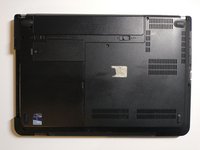
Remove the three back panel screws using a Phillips #0 screwdriver.
 Ask FixBot
-
-
-
-
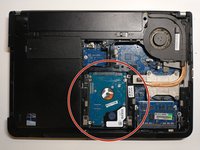
Remove the four screws that hold the hard drive case in place using a Phillips #0 screwdriver.
-
-
-
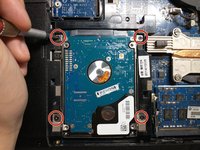
Remove the four screws on the side of the hard drive casing using a Phillips #0 screwdriver.
-
-




To reassemble your device, follow these instructions in reverse order.
Cancel: I did not complete this guide.
6 other people completed this guide.

Team

York University, Team S3-G49, Melo-Thaiss Fall 2020 Member of York University, Team S3-G49, Melo-Thaiss Fall 2020
YORK-MELO-THAISS-F20S3G49
1 Member
12 Guides authored
1 Guide Comment
THANK YOU, purchased with Linux mint cinnamon Una
Beginning to believe my under $100 machine has good bones
Thank God Grok can nanny me along>semi embarrassed face<
Thx again
