Introduction
The screen is a crucial part of a laptop. A screen that is damaged and broken can cause many problems in the display of information. Follow this guide to learn how to replace the screen on a Lenovo Thinkpad Yoga 370.
Before beginning this repair, power off your device and unplug from your power adapter.
What you need
-
-
-
Remove rubber plugs on the lower corners of the screen
-
Unscrew screws under the rubber plugs
 Ask FixBot
-
-
-
Tool used on this step:Tweezers$4.99
-
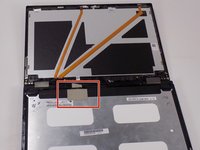
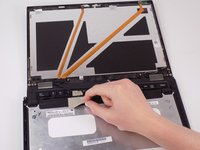
Using tweezers, remove the tape from the display cable below the screen.
-
-
-
Slide the screen downwards towards the keyboard.
-
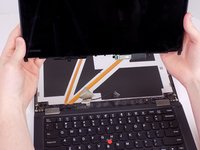
Lift the screen slowly from the frame when the screen is slid down completely.
-
Flip the screen over and lay face down on the keyboard.
-
-
-
Peel the tape off from the back of the screen, connecting the display to the device.
-
Remove the screen.
-
-


To reassemble your device, follow these instructions in reverse order.
Cancel: I did not complete this guide.
One other person completed this guide.

Team

Embry-Riddle Aeronautical University, Team 2-4, Rauch Spring 2022 Member of Embry-Riddle Aeronautical University, Team 2-4, Rauch Spring 2022
ERAU-RAUCH-S22S2G4
3 Members
33 Guides authored
