Introduction
If you need to access your laptops trackpad, or need to replace your laptops battery please refer to this guide. This guide does not require any difficult or complicated steps. Do exercise caution before beginning this guide by ensuring that the laptop is unplugged and turned off. To complete the removal and/or the replacement of your battery, you will need a plastic opening tool, a Phillips #0 screwdriver, and a pair of tweezers.
What you need
-
-
-
Flip your laptop over and place on a flat surface so you can access the screws on the base cover.
-
Using a Phillips #0 screwdriver, unscrew the five screws on the base cover.
 Ask FixBot
-
-
-
Remove the base cover by inserting a plastic opening tool in between the cover and the rest of the laptop.
-
Once the tool is inserted, slide the tool along the edges of the case and push down on the opening tool to detach the case.
-
-
-
-
-
Tool used on this step:Tweezers$4.99
-
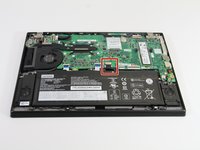
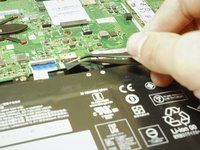
Using tweezers, unplug the battery from the laptops motherboard by pulling on the cable that attaches it.
-
-
-
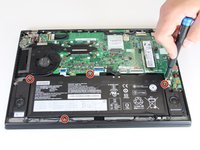
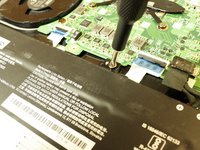
Using a Phillips #0 screwdriver, remove the four 5.2 mm screws holding the battery in place.
-
-





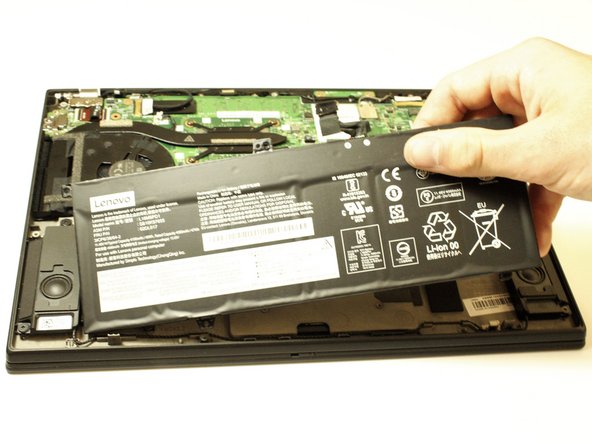
To reassemble your device, follow these instructions in reverse order.
For optimal performance, after completing this guide, calibrate your newly installed battery.
Take your e-waste to an R2 or e-Stewards certified recycler.
Cancel: I did not complete this guide.
4 other people completed this guide.

Team

Clemson, Team 5-1, Hunter Fall 2021 Member of Clemson, Team 5-1, Hunter Fall 2021
CLEM-HUNTER-F21S5G1
5 Members
48 Guides authored
2 Guide Comments
What a blast from the past, thinking about tinkering with electronics! I used to love taking things apart. Lately, I've been hooked on Heardle as a fun music challenge, mostly because it's so satisfying to test my song recognition skills from just that first little snippet. It brings back so many memories. Do you have any specific tools you swear by for delicate repairs like battery replacements?
