
Lenovo ThinkPad X270 External Battery Replacement

Spencer Day and 2 other contributors
Last updated on Sep 16, 2026
Views: 2K
View statistics:
- Past 24 Hours:
- 4
- Past 7 Days:
- 35
- Past 30 Days:
- 126
- All Time:
- 1,965
Comments: 1
1 comment on steps.
Completed: 5 6
5 people have marked this guide "completed." Will you be next?
6 people have marked this guide "completed." Including you — great job!
Favorites: 0 1
No one has favorited (and subscribed to) this guide. Will you be the first?
1 person has favorited (and subscribed to) this guide — and that's you!
Featured Guide
This guide has been found to be exceptionally cool by the iFixit staff.
Introduction
Go to step 1 ↓Use this guide to replace a dead or malfunctioning external battery on your Lenovo ThinkPad X270 laptop.
If you're unsure about the health of your battery, test it using Lenovo Diagnostics.
If your battery is swollen, take appropriate precautions.
What you need
Fix Kit
This kit contains all the parts and tools needed to complete this guide.

Parts

-
-
-
Unplug all cables and fully shut down your laptop.
 Ask FixBot
-
-
-
-
-
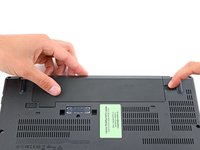
Lay your laptop upside down to access the external battery.
-
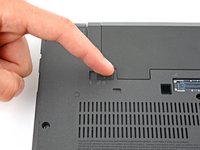
Two sliding tabs secure the battery.
-
-
-
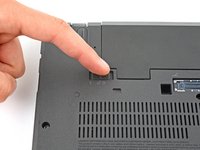
Slide the left tab, labeled 1, to the unlocked position—it'll click into place and release the left side of the battery.
-
-
-
-
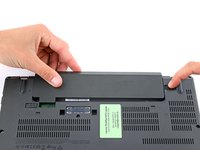
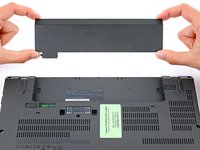
Hold the right tab, labeled 2, in the unlocked position and slide the battery out of its recess.
-
-




Check your repair by running hardware tests with Lenovo Diagnostics.
For optimal performance, calibrate your newly installed battery after completing this guide.
Take your e-waste to an R2 or e-Stewards certified recycler.
Cancel: I did not complete this guide.
5 other people completed this guide.


