Introduction
This guide is for removing the ThinkPad X100e's LCD display and replacing it with a new one.
What you need
-
-
Tool used on this step:Spudger$2.99
-
Use a Spudger tool to remove the screw covers on each side of the screen.
 Ask FixBot
-
-
-
Using a magnetic screwdriver fit with a PH0 Bit, unscrew the two screws and carefully set the aside.
-
-
-
Remove all exposed screws and carefully set them aside. There should be 6 visible screws.
-
-
-
-
Lift the screen up carefully, and remove the screws on both sides of the panel. There should be 4 screws.
-
-
-
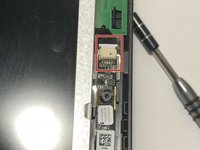
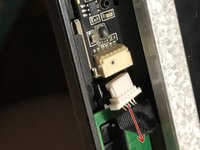
Remove the connector located at the very top of the screen beside the webcam.
-
-
-
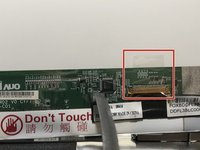
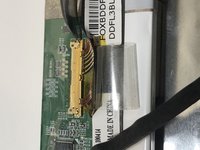
Fold the panel over until a strip of black tape is visible.
-
Peel the tape down until you get to the base.
-
-






To reassemble your device, follow these instructions in reverse order.
Cancel: I did not complete this guide.
One other person completed this guide.

1 Guide Comment
What can be used as a replacement screen, as it's listed not for sale?
