Free Shipping on Domestic Orders $75+

Lenovo ThinkPad T580 Internal Battery Replacement

What you need

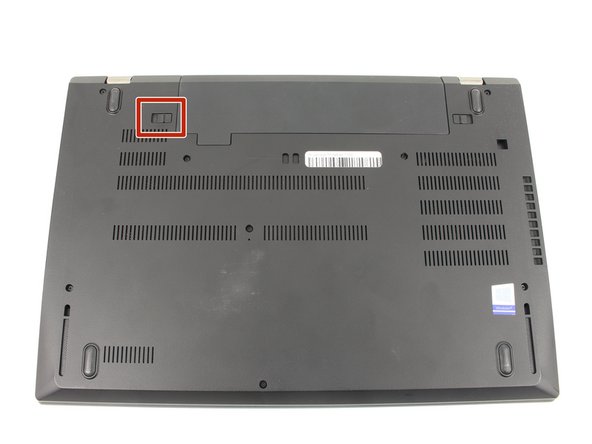
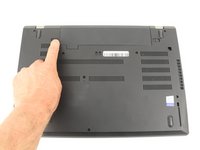
    1. Lenovo ThinkPad T580 Internal Battery Replacement, External Battery: step 1, image 1 of 3 Lenovo ThinkPad T580 Internal Battery Replacement, External Battery: step 1, image 2 of 3 Lenovo ThinkPad T580 Internal Battery Replacement, External Battery: step 1, image 3 of 3
      • Slide the switch on the left side of the battery to the left.

      Ask FixBot

      Add Comment

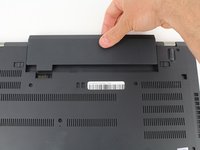
    2. Lenovo ThinkPad T580 Internal Battery Replacement: step 2, image 1 of 3 Lenovo ThinkPad T580 Internal Battery Replacement: step 2, image 2 of 3 Lenovo ThinkPad T580 Internal Battery Replacement: step 2, image 3 of 3
      • Slide the switch on the right side of the battery to the right while applying upward pressure on the battery.

      Ask FixBot

      Add Comment

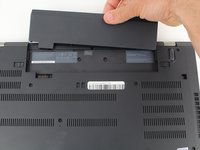
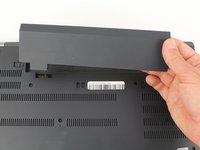
    3. Lenovo ThinkPad T580 Internal Battery Replacement: step 3, image 1 of 3 Lenovo ThinkPad T580 Internal Battery Replacement: step 3, image 2 of 3 Lenovo ThinkPad T580 Internal Battery Replacement: step 3, image 3 of 3
      • Pull the battery directly out of the socket

      Ask FixBot

      Add Comment

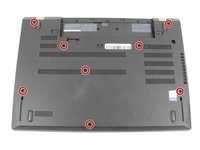
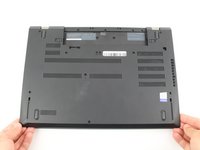
    1. Lenovo ThinkPad T580 Internal Battery Replacement, Bottom Case: step 4, image 1 of 2 Lenovo ThinkPad T580 Internal Battery Replacement, Bottom Case: step 4, image 2 of 2
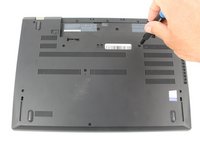
      • Using a Phillips #00 screwdriver, unscrew the eight 3.3 mm captive screws on the bottom of the laptop.

      • The "captive" screws will not come out of the case.

      Ask FixBot

      Add Comment

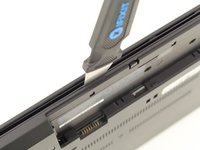
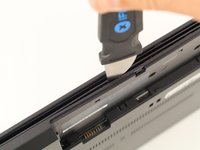
    2. Lenovo ThinkPad T580 Internal Battery Replacement: step 5, image 1 of 3 Lenovo ThinkPad T580 Internal Battery Replacement: step 5, image 2 of 3 Lenovo ThinkPad T580 Internal Battery Replacement: step 5, image 3 of 3
      • Run a Jimmy along the crease of the computer all the way around, twisting it periodically to disengage the clips.

      Ask FixBot

      Add Comment

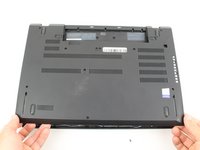
    3. Lenovo ThinkPad T580 Internal Battery Replacement: step 6, image 1 of 3 Lenovo ThinkPad T580 Internal Battery Replacement: step 6, image 2 of 3 Lenovo ThinkPad T580 Internal Battery Replacement: step 6, image 3 of 3
      • Once all the clips are released, remove the bottom cover.

      • You may need to jiggle the case slightly to release the clips around the external battery bay.

      Ask FixBot

      Add Comment

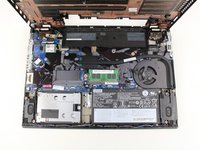
    1. Lenovo ThinkPad T580 Internal Battery Replacement, Internal Battery: step 7, image 1 of 1
      • Using a Phillips #00 screwdriver, remove five 3.7 mm screws holding down the battery.

      Ask FixBot

      Add Comment

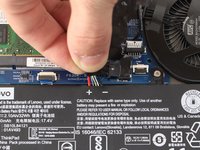
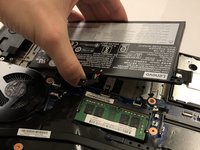
    2. Lenovo ThinkPad T580 Internal Battery Replacement: step 8, image 1 of 3 Lenovo ThinkPad T580 Internal Battery Replacement: step 8, image 2 of 3 Lenovo ThinkPad T580 Internal Battery Replacement: step 8, image 3 of 3
      • Unplug and remove the battery connector from the motherboard.

      • Remove the internal battery.

      Ask FixBot

      Add Comment

Conclusion

To reassemble your device, follow these instructions in reverse order.

Cancel: I did not complete this guide.

6 other people completed this guide.

Ben Elkayam

Member since: 01/23/20

1,105 Reputation

8 Guides authored

Team

Cal Poly, Team S18-G6, White Winter 2020 Member of Cal Poly, Team S18-G6, White Winter 2020

CPSU-WHITE-W20S18G6

4 Members

96 Guides authored

1 Guide Comment

I need to buy the internal battery

Bwambale Landus - Reply Share

Add Comment

View Statistics:

Past 24 Hours: 6

Past 7 Days: 58

Past 30 Days: 245

All Time: 17,555