
Lenovo ThinkPad T570 SSD Replacement

Rylee Hjorth and 3 other contributors
Last updated on Dec 17, 2024
Views: 1.4K
View statistics:
- Past 24 Hours:
- 3
- Past 7 Days:
- 48
- Past 30 Days:
- 154
- All Time:
- 1,407
Comments: 0
No one has left comments on this guide. Will you be first?
Go to guide commentsCompleted: 0 1
No one has marked this guide "completed." Will you be the first?
1 person has marked this guide "completed." It's you — great job!
Favorites: 0 1
No one has favorited (and subscribed to) this guide. Will you be the first?
1 person has favorited (and subscribed to) this guide — and that's you!
Introduction
Go to step 1 ↓This guide will show you how to replace the SSD for the Lenovo ThinkPad T570. Make sure that the device is powered down and the battery is removed from the underside of the computer. There are delicate parts connected to the SSD, so be sure to use careful, deliberate movements so none of the parts underneath become damaged or displaced.
What you need
Tools

-
-
-
Switch the left latch to the left to unlock the battery.
-
While holding the right latch to the right, slide the battery away from the device.
 Ask FixBot
-
-
-
-
-
Loosen the seven captive screws on the back panel of the computer using a Phillips #0 screwdriver.
-
Remove the back panel.
-
-
-
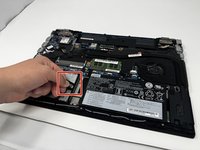
Pinch the black tab and pull it to the left and up to remove the SSD.
-
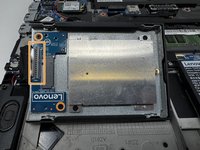
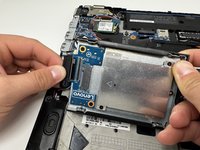
Flip the hinge upward and detach the piece that's connected to the SSD by pulling the tab to the left.
-
-
-
-
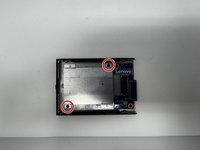
Using the Phillips #0 screwdriver, remove the two 3 mm screws.
-
Remove the metal bracket.
-
Remove the SSD.
-
-




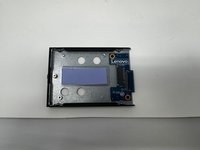
To reassemble your device, follow these instructions in reverse order.

Team

Utah Tech University, Team 1-3, Crenshaw Fall 2024 Member of Utah Tech University, Team 1-3, Crenshaw Fall 2024
UTAHTECH-CRENSHAW-F24S1G3
3 Members
48 Guides authored
